10bet App Review: User and Expert Ratings (2026)
In 2026 it is vitally important that operators make their platforms mobile-friendly. We conduct a 10bet app review to assess whether it delivers that through its mobile app, or if you might as well just stay with the browser site.
We can only bring you that unbiased view by really putting the app through its paces. To do that, we'll download the app, sign up with the bookmaker, deposit real money to it, delve deep across every part of the app and run a withdrawal process as well.

10bet Apps: Download The Latest Android and iOS Versions (October 2026)
In 2026 customers expect their mobile apps to work seamlessly, enhancing their experience. That is exactly what the 10bet is aiming to do, with it available to iOS and Android users.
We give you our rundown here but, in the interest of giving a rounded view, you can check out how the respective apps score from the wider user base:
- ⭐ 2.7 average on the App Store (104 reviews)
- ⭐ 3.2 average on the Google Play Store (295 reviews)
You don't have to take those reviews as gospel, though. Downloading the 10bet app yourself is easy, with three different avenues to do so.
You can head to the 10bet site itself, locating the relevant link and navigating through, whilst heading to your chosen app store and searching for "10bet" is another option. The easiest way of downloading the app, however, is to use one of our dedicated links below.
-
10bet Apps
Google Play App Store


How to Register on the 10bet App
For punters that are already 10bet customers, you can get started on the app using your existing account details. New customers, however, can complete their registration on the app following the below process:
-
Open the 10bet App and hit "Join"
Working on the assumption you have already downloaded the 10bet app, open it and select the green "Join" button located in the top right corner.

-
Enter Your Personal Information
You are now into a four-step registration form. On page one, you have to input your personal details:
- Gender
- First Name
- Last Name
- Date of Birth
Once populated, select the green "Next" button at the bottom of the page.

-
Input Your Contact Details
This next step is ultra-simple. Input your phone number and address before hitting the "Next" button to move onto page three.

-
Set Your Account Details
You now have to input your email address and set your account password.
Beneath that, you can also configure a deposit limit, if you wish to.

-
Configure Your Preferences
Finally, on page four, you can select your chosen bonus structure and configure contact preferences.
Once set, hit the green "Register" button at the bottom of the page.

10bet App Deposits & Withdrawals
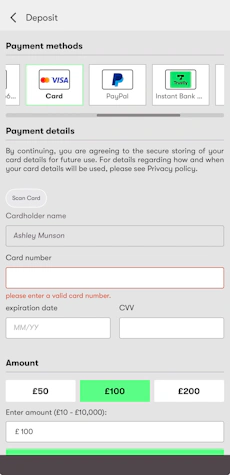
We have tested the deposit and withdrawal processes on the 10bet app, but since they are rather comprehensive subjects, we have dedicated pages for you to check out. On those, you can find all the details about the methods, the step-by-step process and other helpful tips.

10bet App Sports Review
If you are looking for a comprehensive rundown of the 10Bet sportsbook then you're in the wrong place; that's covered in our in-depth 10Bet review. This section is 100% focused on assessing how the sportsbook operates from a mobile app perspective, covering aspects like design, navigation and usability.
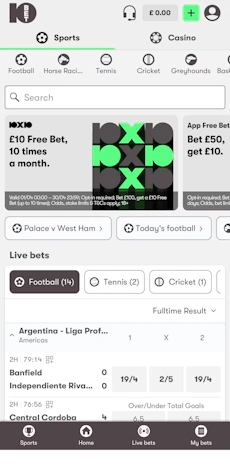
On that note, the first thing to call out is the look and feel of the sportsbook. There is a consistency across the app, with the light grey background being neatly contrasted by dark grey text and icons. It all carries off a premium feel.

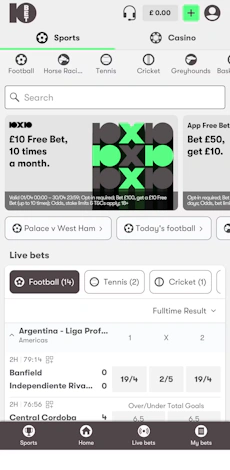
It doesn't just look the part, though. The design is, for the most part, well thought through, starting with the two headline buttons at the top of the app, allowing you to easily drill into the "Sports" section.
Beneath that, you have a series of small but clearly display icons, underpinned with text, that guide you through the most popular sports to bet on.
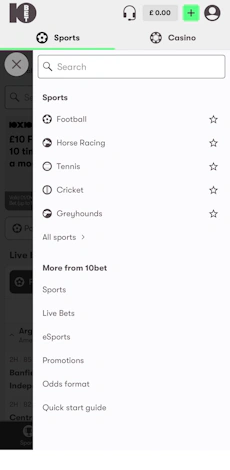
It scores a point for being responsive, swiping from left to right, but it's not an exhaustive list of the available sports. To get this view, you have to utilise the "Sports" button in the site footer, where you can expand "All Sports".
From there, you can favourite sports using the star symbol, which moves them up the main menu. Critically, though, it does not add them to the first-mentioned scroll bar. It isn't a deal breaker by any stretch, but it is not the most intuitive structure to manoeuvre.

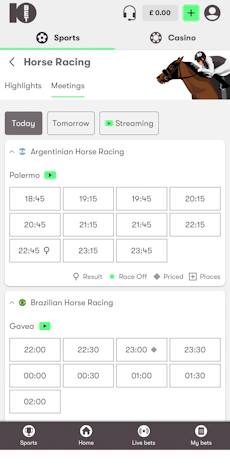
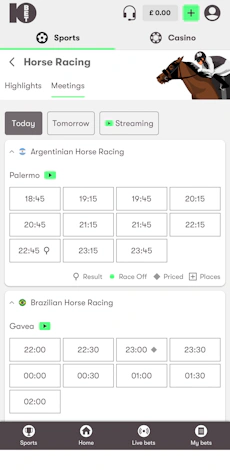
When you get into the real thick of the sportsbook, however, the 10bet app stands up well. Horse racing is one good example of where you have considered menu choices, again following that horizontal layout.
Race meets are clearly defined, using subtle colour contrasts between venue and a drillable view based on start times. The fact you have live streaming isolated as an option is another big tick.

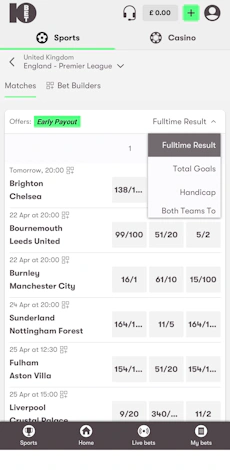
You can continue that positive talk across other sports too. Football is perhaps the biggest example of this, with that very much multi-layered. Scrollable categories run across the top of the page, competitions are nested in an expandable and collapsible manner, and, at the next layer, you get into the odds.
There is a four-tiered dropdown option in the top right, allowing you to easily flick the "front page" into different markets, whilst each fixture is separated with a line. Odds themselves are presented in an easily readable format. Clicking on a fixture drills you deeper once more.

Now you get into a plethora of betting options. Before you even get to the markets, though, there is a good game overview where you can see different stats and form guides. It's a really nice feature. As for the odds, the expandable/collapsible design continues and there is a choice of view available for certain markets.
Over/under type markets being a good example, as you can toggle between seeing "All" or use a slider to switch between 0.5, 1.5, 2.5 etc.
10bet App Casino Review
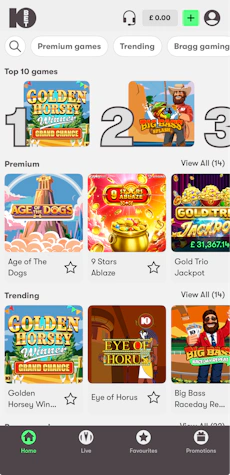
There are design consistencies across the 10bet sportsbook and casino areas, regardless of whether you are looking at the "casino" or the "live casino", and that is a positive from a customer usability standpoint.
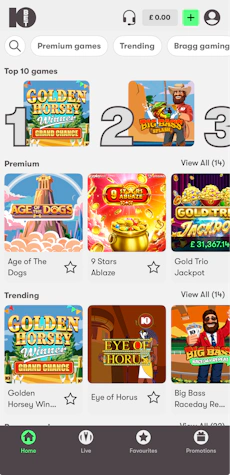
Running across the top of the casino game lobby you have a neatly presented scroller bar, running horizontally across the page. Starting with a text search functionality, it then becomes a form of filter, offering passage to specific casino categories and top-end software provider game titles.
The layout beneath that is just as sleek. Game tiles are well-sized squares, with the option to browse sort titles in a couple of different ways to, namely by A-Z, recently played and the 10bet default. You can also configure favourite games from the main lobby too.
With top games, trending games and new games all positioned in front of you on the casino landing page, there isn't much to be critical of.
The one gripe you could have is the absence of a really top filter tool, with some brands opting for elements like volatility and paylines - but that is a more general 10bet miss, rather than an app issue.

Customer Support on the 10bet App
We are impressed with the customer support offered on the 10bet app. You can't miss the menu options, which live under your main account section. This is an underrated positive to note, with plenty of bookmakers making it hard to navigate to their contact pages.
What follows within the respective help sections - there are a couple that differ very slightly between self-service and direct contact - is very strong.
The layout is bold, clean and easy to explore. Within the FAQ section there is a search functionality, followed by half a dozen large banner-like buttons that serve as filters into specific assistance niches, such as "Account Help" and "Bonus Help". If that's not enough, you then have a view of the most visited articles, which may well aid your navigation further.
Beyond that, you have a more traditional contact centre area, where you can speak to a human. There, you have three options of contact - email, phone and live chat. The latter of those options does not have any bot interaction either, which is a rarity in 2026.
There is just one minor note, which isn't specific to the 10bet app, and that's the fact that the chat and phone lines aren't manned 24/7. Between 01:00 and 08:00, you're on your own.
All in all, though, the customer support function is excellent.
Expert Opinion of the 10bet App

We really like the 10bet app - even if it is sizable at 106MB.
It's not completely perfect, however, any quirks in the app are shared with the browser version, rather than being app issues, and you do get some app-specific features too.
Consider that the app works well, looks smart, and the navigation around the app is slick as well and, in truth, downloading the 10bet app is an easy decision.
More 10bet Guides


Ashley, an Ipswich Town fan, is an experienced content writer in the sports & betting space, who also has an extensive background in data analytics. Those skills combine here to allow for unique angles to be taken across a host of topics.