247Bet App Review: User and Expert Ratings (2026)
In a world where punters want betting at their fingertips we assess whether or not the 247bet app is actually worth using, or whether you are better off sticking with the browser-led version of the site.
In order to really stress-test the app, we download it, register, deposit funds, explore every aspect of the site and complete our assessment by withdrawing funds.

247Bet Apps: Download The Latest Android and iOS Versions (October 2026)
Any brand that entering the online betting market really needs to be offering a mobile app to attract the growing market of "on the go" customers. 247bet does exactly that, with a mobile app available to both Android and iOS users.
With the brand new - and the app even newer - reviews from customers of respective app stores are limited. With that said, this is how the numbers stack up:
- ⭐ 1.4 average on the App Store (13 reviews)
- ⭐ 1.5 average on the Google Play Store (24 reviews)
If you want to make up your own mind on the app, you can download the 247bet easily. There are three avenues to doing so. You can navigate to the browser version of the site, following links to the app. Alternatively, head to your chosen app store and search for the term "247bet".
The third and final option you have is to simply download the official 247bet by using one of our links below:
-
247Bet Apps
Google Play App Store



How to Register on the 247bet App
If you are already a 247bet customer then you can simply use your existing account details to login and start betting. If, however, you are looking to become a new customer then the registration process through the 247bet app is easy.
Simply, follow the below process:
-
Open the 247bet App and Start Your Registration
We are assuming you have already downloaded the 247bet app. If so, open the app and head to the top right corner and locate the green "Sign up" button.
Click it.

-
Create Your Account
You are into the the actual registration form now, which runs across a couple of pages.
On the first page, you are required to create your account by inputting:
- Email address
- Phone number
- Username
- Password
Once done, hit the "Continue" button at the bottom of the page.

-
Input Your Personal Details
In the next page, you have to enter your personal details, which includes:
- First Name
- Last Name
- Date of Birth
- Gender
- Address
Hit the "Continue" button when done.

-
Set Your Deposit Limit
As part of the registration process, you can configure a deposit limit. This is done by simply picking the relevant option, before hitting the "Continue" button.

-
Agree to Terms
Last but not least, you will have a standalone page that asks you to agree to the terms and conditions attached to 247bet.
Once you have accepted the terms, by ticking the tick box, you will be able to complete your "Sign Up" by hitting the aptly titled button.

247Bet App Deposits & Withdrawals
We have tested the deposit and withdrawal processes on the 247Bet app, but since they are rather comprehensive subjects, we have dedicated pages for you to check out. On those, you can find all the details about the methods, the step-by-step process and other helpful tips.

247bet App Sports Review
If it is the real ins and outs of the 247bet sportsbook you are looking to understand then allow us to kindly redirect you to our in-depth 247bet review. Here, our focus is specifically on the mobile app. That means our focus is on how the sportsbook is laid out and how it operates.
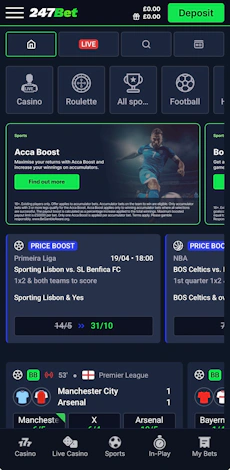
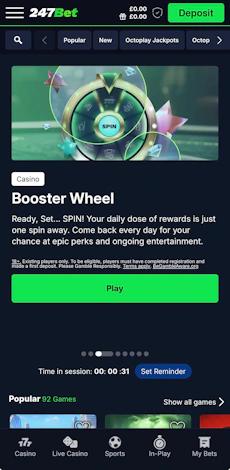
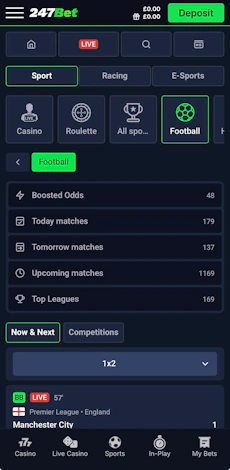
Accessing the sportsbook - or the casino for that matter - is achieved by using the bottom ribbon on the app. Text and icons are combined here, making each section easily identifiable.

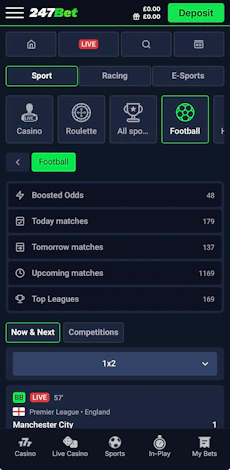
When in the sportsbook, the design is fine. The background and buttons are similar in colour, both shade of dark blue, but with grey icon and button trims contrasting smartly, as does the white text used throughout the sportsbook.
The aforementioned grey icons run across the top of the sportsbook and are manoeuvred left to right, in order to explore the various sports available to bet on.
Our only critique here is that "Casino" and "Roulette" do feature amongst this navigation pane; there is no need, they are not sports driven and the user will have already opted to navigate to sports specifically. With that said, the tiles are large and navigation between the options is highly responsive.

Just above those options is a slimmer, fixed menu featuring four buttons, one of which is a search button.
As for the look and feel in the thick of the sportsbook, the specifics depend on what sports you drill into, but the format is similar regardless.
The chosen menu option will highlight green, with the top part of your screen now featuring a set of quick-search options, such as "Today matches" and "Boosted Odds".

Depending on your next choice, you can explore events by competition and/or country with each of those collapsible and expandable to make browsing simpler. The structure of events is very good. Each event is afford significant space, with clean odds layout and clear separation from other events.
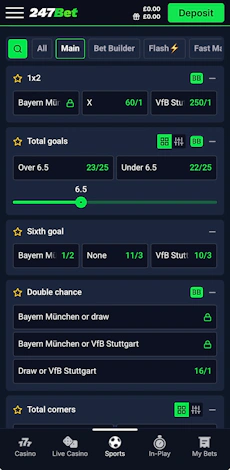
When you then drill into a specific event, the look and feel remains consistent. Odds remain neat and tidy, markets are well-separated and there are some smart features in how users display odds.
Markets, similar to aforementioned structures, can be collapsed and expanded as you see fit, whilst certain markets can be transformed between slider bars and listed odds.

247bet App Casino Review
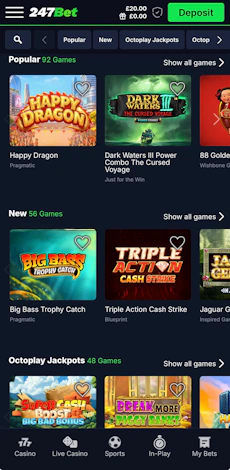
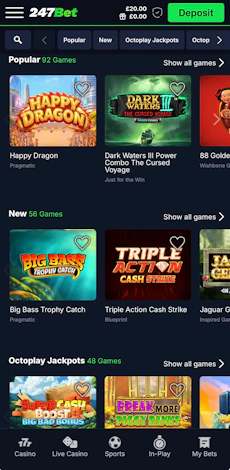
The 247bet app provides the casino in two forms - one under "casino" and the other under "live casino" - but with both following an identical layout.
From a colour scheme perspective, it follows the same look and feel as the sportsbook, with a similar design running through navigational steps too. You have a horizontal scroller at the top of the page, allowing you to pick a casino game category, whilst there are search functions and filtering tools either side of that scroll bar.
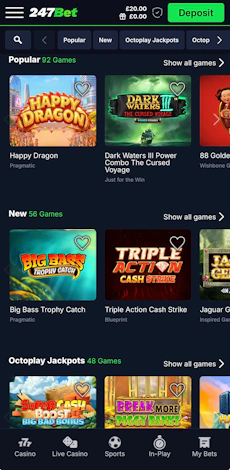
You then get into the game lobby itself, where you will find modern tiles. Square in shape, with curved edges run three-wide on the page, with each bottomed by a white title and, in grey, a callout of the software provider. You also have the ability favourite games as well, which is another neat user-focussed feature.

Customer Support on the 247bet App
The 247bet customer support offering is alright. From an app design perspective, making the first contact is easy. A "Chat with Us" option lives under the main menu, which is hard to miss. This connects you to a 24/7 live chat function, which is partly AI-led but does pre-fill certain bits of information i.e. personal details for you.
There is also the option to email the 247bet team, whilst there is a FAQ page that includes 64 different articles. The FAQ, however, does divert you to the 247bet website, thus removing you from the app.
Expert Opinion of the 247bet App

The 247bet app is not going to change your world, however, it does have some neat features and it operates slickly across both the sportsbook and casino, with all the relevant touch points responding as you'd expect. On top of that, it looks the part too, boasting a fairly premium feel.
If you are a 247bet player, we'd recommend making the switch from browser to app.
More 247bet Guides





Ashley, an Ipswich Town fan, is an experienced content writer in the sports & betting space, who also has an extensive background in data analytics. Those skills combine here to allow for unique angles to be taken across a host of topics.