Swifty Sports App Review: User & Expert Ratings (2026)
The purpose of our Swifty Sports app review is to ensure you are clued up on what to expect from it.
Whether you are a new customer or an existing 'Swifty' that is yet to take the plunge into the app, we'll leave you informed about how to download the app, sign up, deposit funds and much more.

Swifty Sports Apps: Download The Latest Android and iOS Versions (October 2026)
Swifty Sports doesn't have a long history behind it. However, it has clearly entered the market with a good understanding of what modern bettors want. A big part of that is having a good platform to play "on the go", which includes offering a mobile app.
There are two ways to download the Swifty Sports app. The first involves navigating directly to the Swifty Sports site. From there, head to the site footer and you'll find a horizontal button that spans the width of the page. It reads 'Download our mobile app'.
Clicking on the button, you'll then see a redirect to your app store.
The other option you have is to navigate to your chosen app store. Here, search for the term 'Swifty' and locate the app 'Swifty Sports' by Swifty Global.
The app has limited customer reviews, scoring a middling 3 out of 5 stars. It's nothing to write home about but, equally, we'd encourage you not to read too much into such a small sample of customer reviews.
-
Swifty Sports Apps
Google Play App Store


How to Register on the Swifty Sports App
If you are already a Swifty Sports customer then you don't need to register again. Simply download the app and login using your standard login information.
If, however, you are new to Swifty Sports, you can register directly on the app. Follow our registration steps below:
-
Open the App and Hit 'Register or Login'
Open the Swifty Sports app. In the top right corner, you will see a white button stating 'Register or Login'. Click it.
You will then need to click on a gold button containing the same wording.

-
Enter Your Key Account Detail
There is now a registration form to navigate through, which starts with entering your email address.

Follow the process through, clicking the golden 'continue' buttons that appear once all required information has been entered.
The information you will need to provide is: Email address, Name, Country of residence and Date of birth.
-
Complete the Registration
Once the above information has been given, you will need to create a password and configure your marketing preferences. You will then need to verify your email address, which simply involves submitting a four-digit code.
You can also repeat this process for your mobile phone number. Your account is now setup.

Swifty Sports App Deposits & Withdrawals
We have tested the deposit and withdrawal processes on the Swifty Sports app, but since they are rather comprehensive subjects, we have dedicated pages for you to check out. On those, you can find all the details about the methods, the step-by-step process and other helpful tips.

Swifty Sports App Sports Review
Our Swifty Sports app-focused review looks at how the app operates across sporting markets, including app structure, navigation and general responsiveness. If you are looking for information on the sportsbook specifically, we would recommend reading our full Swifty Sports review instead.
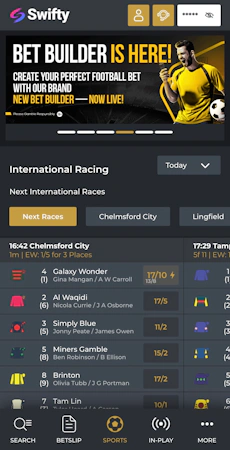
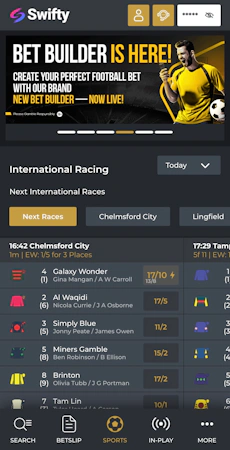
Your default sports view sees the top quarter of the screen dominated by promotional information, be it big-picture offers or specific price boosts.
Underneath that you get a view of horse racing, which can be toggled through a horizontal menu that details different courses and dropdown button that changes the time period. Below that, you get a view of what Swifty feel are the top events across all sports.

The main way of navigating the sportsbook though comes courtesy of the 'Search' button in the bottom left corner. This opens up a vertical menu that lists all of the available sports. When picking one of those sports, for example football, your view changes again.
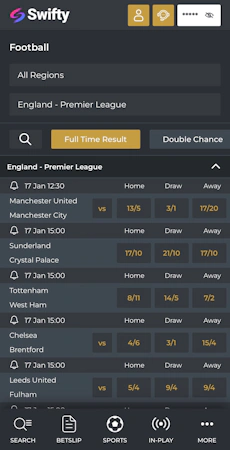
Now you can see the current live events as a default but that's easily changed. Two options at the top of the page allow you to switch between region and competition, whilst a quick-reference horizontal scrollbar allows you to toggle the default view between a series of popular betting markets.
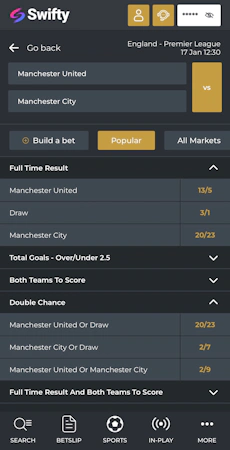
The fixture and odds layout here is really clean; it's easy to look at with odds simple to interpret.

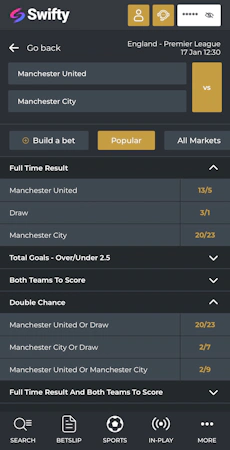
When you then click on a specific event, which in the case of football means a fixture, the look and feel of the app remains very similar. Markets are collapsible, meaning you don't waste time scrolling through huge lists of odds.
Placing a bet is easy too. Simply clicking on a specific price brings up a betslip. From there you can configure a stake and bet.

Swifty Sports App Casino Review
With a name like 'Swifty Sports', it is hardly surprising that the sportsbook takes centre stage on the app. You can also access a casino and live casino, though.
Hitting the 'More' option on the app footer will bring up these options. Note, the image below shows a 'Less' button - this is interchangeable with the aforementioned 'More' button depending on whether or not the menu has been expanded or not.

Whether you are navigating to the casino or the live casino, the view and structure you get is the same. That's good - consistency really boosts the user experience.
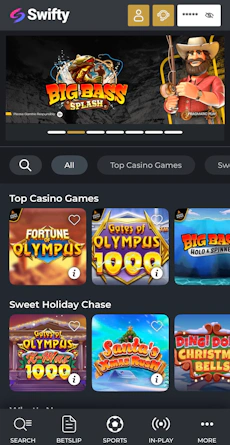
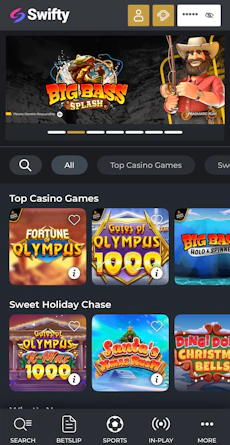
Like in the sportsbook, there is a top panel that dominates the top quarter of the default page. Expect to see bonus offers and promoted games featured across this space.
Under that, you have a scrollable horizontal menu that enables you to filter by different game categories, whilst a search option exists on the left-hand side of that.

Then, you get into the game library itself. Sub-headings are clearly displayed and game tiles are well-sized.
To further aid the user, each tile contains an 'i' icon in the bottom corner. Clicking on this brings up minimum and maximum stake information and the RTP and number of reels attached to the game.
Customer Support on the Swifty Sports App
Your main route to contacting Swifty Sports is a live chat function. It's easily overlooked on the app, but actually, once you know where it is, it's super accessible. It lives in the app header, which is constantly visible. It's the small headset icon next to your account balance.

Response times were pretty much instant during our exchanges, with Swifty support being polite and detailed with their replies.
Expert Opinion of the Swifty Sports App

We really like the Swifty Sports app. The appearance of the app is smart, the layout is decent and every touch is responsive regardless of whether you're in the sportsbook or casino.
The only thing that keeps it away from being a truly top-tier app is a lack of personalisation control in respect of default views.
Still, all things considered, if you're a Swifty customer - or planning on becoming one - we fully recommend downloading it.
More Swifty Sports Guides


Ashley, an Ipswich Town fan, is an experienced content writer in the sports & betting space, who also has an extensive background in data analytics. Those skills combine here to allow for unique angles to be taken across a host of topics.