All British App Review: User and Expert Ratings (2026)
To assess whether it is worth downloading, we test the All British app across all fronts. We complete the registration process, deposit funds, navigate across the sportsbook and casino and withdraw to complete the end-to-end exploration.

All British Casino App: Download The Latest iOS Version (October 2026)
There are three ways you can go about offering a mobile app. You can choose not to, you can make a token effort or you can look to genuinely enhance the customer experience.
We'll give you our read on what All British app offers as we step through our review, but we are well aware that we're that other people have a voice too. That is why we are transparent with how the app scores in the app store:
- ⭐ 4.1 average on the App Store (300 reviews)
Note: As of October 2026 the All British app is available for iOS users only.
The app score rating is a good one. If you want to see what all the fuss is about, you can download the app for yourself. There are a couple of different ways you can go about doing so.
You can head to the app store and search for the term "All British Casino". Once there, you are looking for the app offered by SPP Media Ltd. Alternatively, you can download the app by following our dedicated link below:
-
All British iOS App

How to Register on the All British App
If you are an existing customer of All British then you simply need to download the app and login using your usual account details.
If, however, you are a newcomer to All British, you can register directly on the app. Simply follow these steps:
-
Open the All British App and hit "Join"
Once downloaded, open the All British mobile app and click on the white "Register" button located in the top right corner.

-
Confirm Your Account Detail
There are four short pages to update in order to complete your All British registration. Page one requires you to input your email address and create a password.
Hit the red "Next" button when done.

-
Input Your Personal Details
Now on page two, you have to input a range of personal information. The required fields are:
- First Name
- Last Name
- Title
- Gender
- Mobile Number
- Date of Birth
When complete, advance to page three using the red "Next" button.

-
Enter Your Address
You now have to enter your address details. This can be done using the smart-search function, driven by your postcode or by entering your address manually.

-
Configure Your Preferences
The last hurdle in your All British sign up process is a series of tick boxes. These cover terms and conditions and marketing preferences.
Once all boxes are ticked, a red "Register" button will appear in the bottom right corner of the app. Click it to complete your registration.

All British App Deposits & Withdrawals
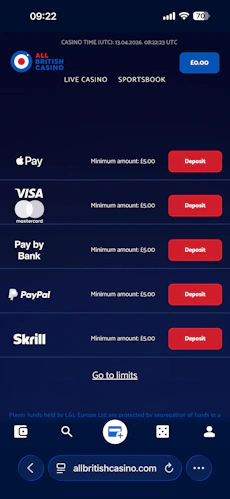
We have tested the deposit and withdrawal processes on the All British app, but since they are rather comprehensive subjects, we have dedicated pages for you to check out. On those, you can find all the details about the methods, the step-by-step process and other helpful tips.

All British App Sports Review
Before we get into the All British app sports review, we should stress that this is not a review of the sportsbook itself; that is covered in our in-depth All British review. The focus of this section is specifically on the app itself. That means assessing the structure and usability of the sportsbook within the app.
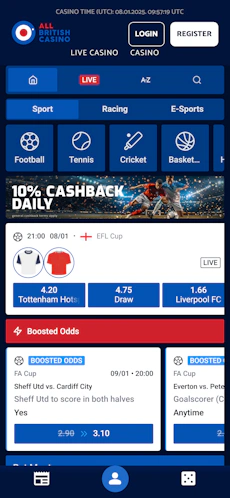
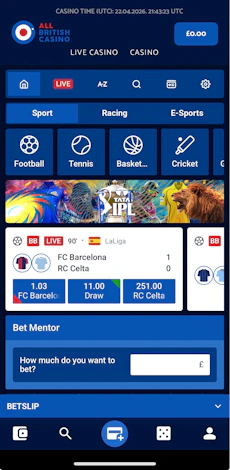
You navigate to the sportsbook from the app header, where you have two sections to choose from, both of which are text buttons. It doesn't look fancy but is intuitive!
Once in the sportsbook, there are three layers of headings that span across the top, each intended to aid navigation.

The top layer includes some general account options, alongside a search function, an A-Z and a live sports link. Beneath that, is a thin bar that gives you the choice to isolate "Racing" and "E-Sports".
Finally, at the third-layer, you get the more traditional horizontal scrollbar, populated with icons and text, to guide you through some of the most popular sports.
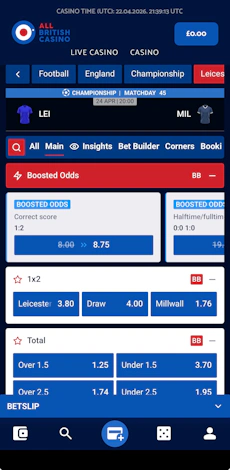
What you see in the main body of the sportsbook varies depending on what sport you drill into. All follow the same look and feel, though, which is a dark background, royal blue buttons and nicely contrasted white blocks breaking out the specific events.

The presence of another scrollbar sits over the odds, allowing sub-category browsing. So far, so good. But...there are some rendering issues with this part of the app.
During our testing, we experienced the events not reflecting the categories selected. That is not a good look and really hampers your ability to bet in a slick manner.
An example is shown below, where we've selected "Tomorrow matches" but with the immediate events showing events in play now.

If you can look past that problem, the structure of the sportsbook is pretty good. You can collapse competitions to improve how you manoeuvre around the app, whilst you can also use the down arrow against specific events to expose deeper market depth without losing visibility of the wider coupon. A minus sign then appears to collapse those markets.

Those design choices exist when you click into an event in "full mode" too. A horizontal navigation bar sits at the top once again, markets can be expanded, collapsed and favourited, and you can also apply user preferences to certain markets to change how markets are displayed. This allows you to flick between lists and slider bars.

All British App Casino Review
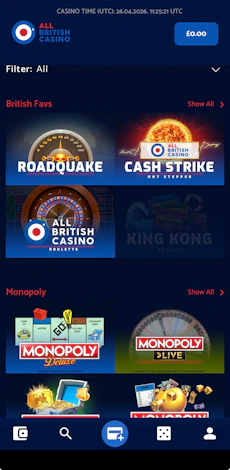
The colour scheme remains consistent across sports and the casino on the All British app but, compared to alternatives in the market, the game lobby layout has a slightly dated feel to it.
The top of the main casino lobby sees a filter, which is a dropdown. This only runs as deep as offering sub-category navigation, though, not more detailed filter options, such as offering targeting through game volatility and minimum bet.
The game tiles are large, but with next to no spacing between them. Operationally, it works fine, but it isn't the best looking casino library you will see.
We also witnessed some challenges with loading times, which led to certain game tiles appearing "greyed out" despite the fact they were still valid and available titles.

We've highlighted some minor negatives above. What really frustrates, though, is that none of them exist in the live casino.
The live casino sees a smarter layout of navigation, with a horizontal scroll bar guiding you through sub-categories, the ability to filter by game provider and, finally, game tiles are presented with better spacing too.
Don't get us wrong, the All British casino is far from terrible, but if both sections operated like the live casino, it would score more highly.

Customer Support on the All British App
Customer support on the All British mobile app doesn't feel like it is front and centre of the bookies mind, but it is still a strong part of the brand's offering.
Navigating to your account section presents a blue "Support" button, located in the bottom left corner, away from the main account menu options. From here, you can connect with All British in four different ways:
- Live Chat (available 24/7)
- Phone
- Social Media (Facebook & X)
In 2026, live chat is probably the most widely used method of customer support. It is solid too. You do have to input a couple of account details before starting, which isn't the slickest process considering you are already logged into an account, but there is no AI-bot involved, and the human response time was rapid during our tests.
The FAQ section, however, is buried in the site footer and, in truth, pretty lacklustre in what it offers.
Expert Opinion of the All British App

There are some perks to using the All British app, with the receipt of push notifications probably being the most noteworthy.
To be blunt, though, we were hoping for a little more.
The app looks good, buttons are responsive and easy to interact with, and there are some smart user-led choices in how content is viewed, however, there are also some sizeable chinks in the armour too.
The biggest of those being challenges with how the menu options don't always deliver the navigation you would expect. It's a huge point of friction, which is not what you want.
With that said, using the browser-led version of All British doesn't take those bugs away.
If we were to sum up the All British app in short; distinctly average.

Ashley, an Ipswich Town fan, is an experienced content writer in the sports & betting space, who also has an extensive background in data analytics. Those skills combine here to allow for unique angles to be taken across a host of topics.