Meta Betting App Review: User and Expert Ratings (2026)
We have conducted a robust test of the Meta Betting app, with the sole aim of leaving you informed about whether it is worth using or not.
Starting by downloading it, before registering, depositing on the app, exploring the various sections it offers punters and, finally, completing a withdrawal process, we are able to bring you a real-world view of how the Meta Betting performs.
As we go through these various steps, we'll pull no punches, shining a light on both the good and the bad.

Meta Betting Apps: Download The Latest Android and iOS Versions (October 2026)
With Meta Betting being a recent entrant to the online betting industry, you would expect it to offer a mobile app. It does, offering an app to both iOS and Android users.
We will go into detail on the app, providing our own insights, but it is important to acknowledge that other people have thoughts too. This is how the Meta Betting app reviews flow through from the different app stores:
- ⭐ 3.8 on the App Store (6 reviews)
- ⭐ 2.1 on the Google Play Store (7 reviews)
If you combine those two scores, you end up in a position where the app is viewed as somewhat "average". We'd urge caution with relying too heavily on those reviews though; the sample size is very small, meaning it can be swayed heavily by just a single review.
After reading our Meta Betting app review, you might decide it is time to establish your own opinion too. If that is the direction of travel you wish to take, doing so is ultra simple with three alternative avenues to download the app:
- Download it directly from the Meta Betting site.
- Search for it on your app store of choice.
- Simply click on one of our dedicated links to initiate download.
-
Meta Betting Apps
Google Play App Store


How to Register on the Meta Betting App
The sign in details attached to the Meta Betting app are exactly the same as those you use when accessing the browser led version of the site, meaning it's easy for you to get started.
If you are new to Meta Betting then you too can get started easily. Simply follow our sign up steps below:
-
Open the App and hit "Register or Login"
On opening the Meta Betting app, you will see a white button located in the top right corner, labelled "Register or Login". Click it.

This will open another page, where you again have to click "Register or Login".

-
Enter Your Email Address
Now enter your email address into the relevant field and hit "Continue" when done.

-
Enter Your Personal Details
You will now need to input a range of personal information:
- First Name
- Last Name
- Country of Residence
- Date of Birth
Alongside the above, you will also need to create a password for your account and agree to the Meta Betting terms and conditions.
After completing this information, hit "Continue".

-
Configure Your Marketing Choices
You will be presented with a number of toggle options regarding the notifications you are happy to receive.
Configure these as you wish and hit "Continue" when content with your choices.

-
Verify Your Email Address
You will now need to validate your email address with Meta Betting. This is done by entering a four-digit code.

-
Turn on Face ID
You now have a choice to turn on Face ID within the Meta Betting app, albeit you can choose to skip this step.

-
Turn on Push Notifications
If you opted out of notifications in the earlier step, Meta Betting take a second bite of the cherry here, asking you to reconfirm.

Meta Betting App Deposits & Withdrawals
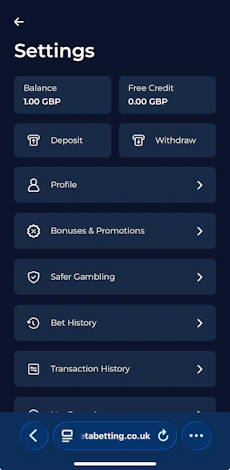
We have tested the deposit and withdrawal processes on the Meta Betting app, but since they are rather comprehensive subjects, we have dedicated pages for you to check out. On those, you can find all the details about the methods, the step-by-step process and other helpful tips.

Meta Betting App Sports Review
If you are looking for a detailed rundown of everything Meta Betting has to offer in the sports space then you want our in-depth review of the operator. Here, we are solely focussed on how the sportsbook is displayed and works within the Meta Betting app.
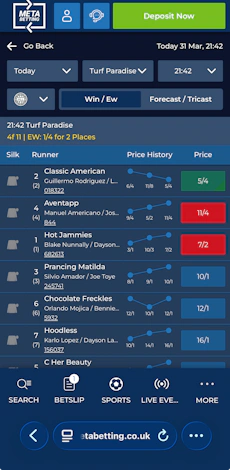
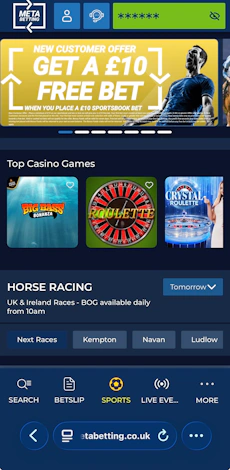
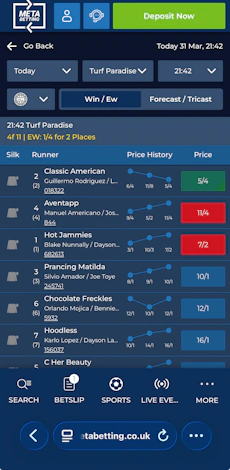
The first thing to note is that the sportsbook is easy to navigate within the app. It is the app landing page, with four core pillars forming a horizontal menu at the top of the page; this features the two most popular sports for bettors - Horse Racing and Football - alongside promotional offers and odds boosts. A text search function sits in that section too, enabling targeted exploration.
Where you want to have a more general browse of the sportsbook, you can use the search bar from the footer menu. This sees a menu appear from the left of the app and details a full overview of all the sports covered by Meta Betting. It is well structured and cleanly labelled, making interaction smooth.
When you step into a specific sport, the view you see changes. Take football, for example. You get the other available sports spanning across the top of the app, in icon form, as a horizontal scroll bar. Under that, you can narrow down the region and date of the events you want to focus on.

Beneath that, you can change the specific betting market you want to bet on. It's only a narrow ribbon and covers just some of the more popular markets.
From there, you get into the full event rundown and odds. Separation between events is strong, changing prices and price boosts colour code as you dabble too. You can expand and collapse sections as well, again aiding the user experience.
When you want to explore an event more deeply, simply click on it. Your view again changes but there is a lot of familiarity. Market categories can be browsed in a horizontal menu, markets are collapsible and the odds are easy to read.

Meta Betting App Casino Review
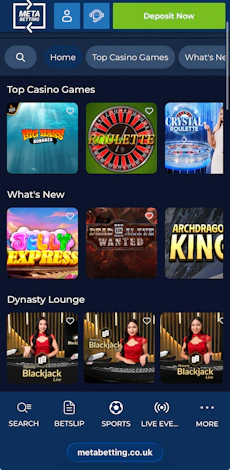
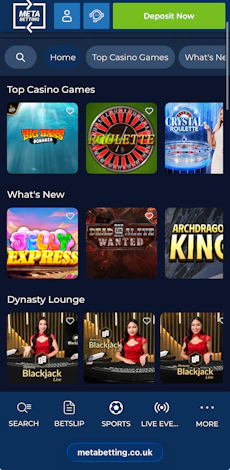
The Meta Betting app splits your casino options into two camps; a traditional casino and a live casino. Both are accessed in the same way and present in exactly the same fashion.
It's largely a no-thrills experience but it it is cleanly put together. You've got a horizontal scroll bar that displays casino categories, a simple game filter and a text search functionality. All of this helps you narrow through the library of games that are offered.

You are now into the game lobby itself. Game tiles are nicely sized, sitting square in shape but with rounded edges. It makes for a modern feel. Within each game tile, you also have the ability to favourite games, courtesy of a little heart icon. These then get added to a quick access panel within the casino lobby.
Customer Support on the Meta Betting App
If you check out our in-depth Meta Betting review, we laud the customer service it offers as a company. The app delivers to those same heights.
In the site header bar you will see a headset icon appear. This is your avenue into the Meta Betting live chat. It is genuinely very good, with instant human interaction, detailed answers to questions and an availability time that runs 24/7.
If that isn't enough for you, Meta Betting also offers customer support through email and telephone, which makes them quite a rare player where the holy trinity of customer service is concerned.
Expert Opinion of the Meta Betting App

The only area of frustration we have with the Meta Betting app is the repetition in the registration process, specifically around marketing preferences.
Thankfully, it is not a factor that bother you on an ongoing basis and, critically, the app performs well where it needs to most, which is with your day-to-day betting needs.
The layout of the Meta Betting app is clean and easy to follow, bets are easy to place and at 56.1MB, it is hardly a huge drain on your device memory, even if its not the smallest betting app we've come across.
All things considered, we do think there is benefit to be had by using the Meta Betting app.
More Meta Betting Guides


Ashley, an Ipswich Town fan, is an experienced content writer in the sports & betting space, who also has an extensive background in data analytics. Those skills combine here to allow for unique angles to be taken across a host of topics.