Bwin App Review: User and Expert Ratings (2026)
We have conducted an in-depth Bwin app review, focusing entirely on the app itself, from point of download and all the way through.
We will be looking at the app structure, how it works, how it's laid out and how you can complete key processes on the app.
With that in mind, if you want a deep dive on the betting markets offered or the number of casino titles you can play, you need to check out our operator deep dive.

Bwin App Ratings, Reviews & Download Links
Whether you opt for an Android or iOS device as your go to, you will be able to download the Bwin app and test it out first hand.
Before we get into our thoughts on the app, it is worth taking a look at what the wider consensus is, which includes shining a light on how the respective app stores rate it:
- ⭐ 4.7 on the App Store (4.5k reviews)
- ⭐ 4.5 on the Google Play Store (1.25k reviews)
With thousands of user reviews conducted across both app stores, and the Bwin app scoring a tidy 4.5 out of 5.0 stars as a baseline, it is fair to say the brand must be doing something right.
We will be coming on to our detailed thoughts on each area of the app offering, but if you are already sold on the Bwin app download, there are a couple of ways to download it:
- Our recommended way would be to utilise one of our dedicated links; this way you can be sure of getting the correct Bwin app.
- Head to your chosen app store and search "Bwin".
-
Bwin Apps
Google Play App Store



How to Register on the Bwin App
If you are an existing Bwin user, then you won't need to know how to register on the Bwin app. Simply download it and login with your usual credentials.
If, however, you are looking to sign up with Bwin for the first time, you can go through your entire journey on the app. Just follow these steps:
-
Open the App and hit "Register"
After downloading and opening the Bwin app, head to the header bar and click on the yellow "Register" button.

-
Select Your Country & Input Your Email
The Bwin sign up process breaks things into bitesize chunks, with the first of those asking you to declare your country of residence and input your email address.

-
Create Your Password
You will now be prompted to create your password for Bwin. This must include an upper and lowercase letter, a number and a minimum of eight characters.

-
Input Your Personal Details
Across the next few pages of the Bwin sign up form you will be asked to input your personal details. These details include your:
- Name
- Date of Birth
- Mobile Number
- Address

-
"Create my Account"
On the final page of the sign up form you will have to confirm your playing currency and, finally, hit the green "Create my Account" button.

-
Set Your Preferences
After creating your account, you will have one last screen to complete. This is a series of tick boxes that approve or disapprove of ways for Bwin to contact you.

How to Deposit on the Bwin App
When playing on the app, it is likely you will want to add funds at some point. You can deposit on the Bwin app by following the process below:
| Payment Method | Min Deposit | Max Deposit | Deposit Fee | Processing Time | Triggers Bonus |
|---|---|---|---|---|---|
 Apple Pay | £5 | £1,250 | No fee | Instant | |
 Revolut Pay | £5 | £1,250 | No fee | Instant | |
 Visa | £5 | £1,250 | No fee | Instant | |
 Mastercard | £5 | £1,250 | No fee | Instant | |
 Instant Bank Transfer | £5 | £1,250 | No fee | Instant | |
 Paysafecard | £5 | £1,250 | No fee | Instant | |
 PayPal | £10 | £1,250 | No fee | Instant |
| Payment Method | Min Withdrawal | Max Withdrawal | Withdrawal Fee | Withdrawal Time |
|---|---|---|---|---|
| Apple Pay | £10 | £100,000 | No fee | 5 mins in our test |
| Revolut Pay | £10 | N/A | No fee | Up to 5 days |
| Visa | £10 | £100,000 | No fee | Up to 5 days |
| Mastercard | £10 | £100,000 | No fee | Up to 5 days |
| Instant Bank Transfer | £10 | £100,000 | No fee | Up to 5 days |
| Paysafecard | £10 | £2,000 | No fee | Up to 5 days |
| PayPal | £10 | N/A | No fee | Up to 5 days |
-
Hit "Deposit"
In the app header, click on the yellow "Deposit" button.

-
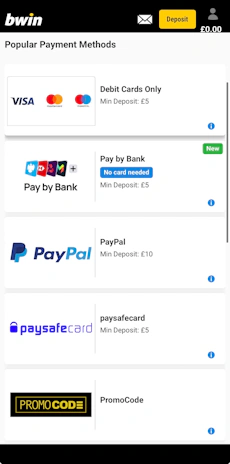
Pick Your Payment Method
A list of available payment methods will be shown to you. Click on your preferred option.

-
Input Your Payment Details
On adding a new payment method, you will be prompted to input the relevant payment details.
As this can vary by payment method, follow the intuitive on-screen form.

-
Pick Your Deposit Amount
You can now input your desired deposit amount, which can be keyed in directly to the "Amount in £" box or applied using the quick-touch buttons of £20, £50, £100 and £200.
When done, click "Deposit".

-
Deposit Successful
A screen will appear to confirm that your deposit has been successfully made.

How to Withdraw on the Bwin App
With a stroke of luck, you'll be withdrawing funds from your Bwin account more often than you're depositing to it.
Thankfully, withdrawing your funds is easy too. Simply follow our Bwin withdrawal process:
-
Open Your Account Menu
Open the account menu by clicking on the head and shoulders icon in the top right corner.

-
Click on "Withdraw"
From the account menu, click on the "Withdraw" option.

-
Enter the Withdrawal Amount
Choose your withdrawal amount and, when done, click on the yellow "Withdraw" button at the bottom of the page.

-
Withdrawal Pending
You will now see a message that confirms your withdrawal request has been received.

Bwin App Sports Review
Remember, this is not intended to be a detailed run through of what the Bwin sportsbook offers; that is covered in our in-depth Bwin review.
Our focus here is to explain how the sportsbook behaves on the Bwin app, considering layout, navigation and interactions.

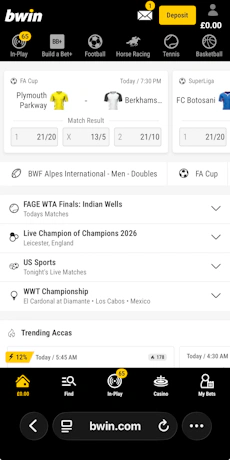
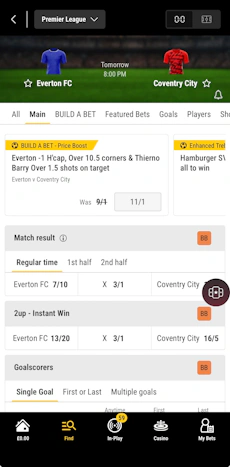
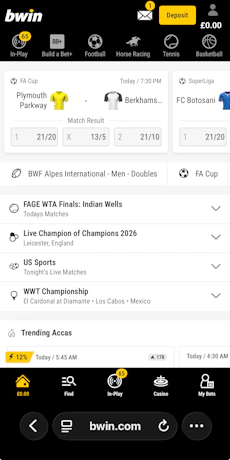
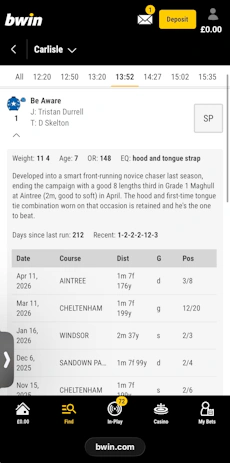
The main app landing page defaults you to the sportsbook, where you will find white tiles positioned on an off-white background. Top and tailing the app screen, though, are two black bars.
The footer bar features a fixed width five icon layout, enabling navigation to in-play markets, your betslip and more, whilst the header bar is a horizontal scroller that enables you to browse through a number of popular sports.
Navigating across this header bar is smooth with a further "Find" option in the site footer enabling you to access the full sports A-Z. You can click into any of these options, with the view you get changing based on your choice, but with the core design of the app aesthetic unchanged.
Football is one of the most popular sports to bet on, which we'll use as an example to showcase how the Bwin app layers together.

Live markets are neatly highlighted through a icon in the header bar but beneath that you quickly get into four different layers of navigation:
- Headline areas, such as "Competitions" and "Teams".
- Hot pick topics, like "Enhanced Accas" and "England".
- A date picker that allows you to focus on any given day from the next week.
- A range of betting forms, like "1X2", "Over/Under" and "Next Goal".
Despite four layers of horizontal exploration, the design means it puts good flexibility at your finger tips but maintains an attractive look and feel. From there on in, you get into the specific fixtures taking place, where games are clearly separated and odds displayed neatly.

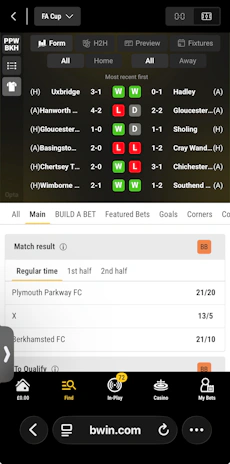
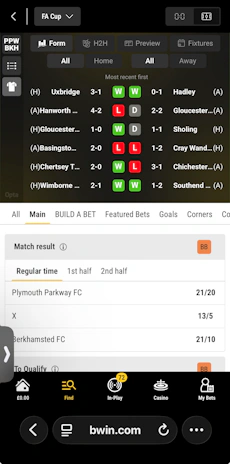
When you drill into an event, the market and odds structure is like you'd expect from any well put together modern operator. You can collapse and expand markets, view icons to understand which can be used in bet builders.
At the top of the page, meanwhile, you can browse different bet types in scroller bar form. Above that, you have the event header. The default is team kits and the kick off time, whilst a toggle will showcase a a range of stats, including a detailed Opta rundown.
It is hard not to be impressed with how the Bwin sportsbook is constructed.
Bwin App Casino Review
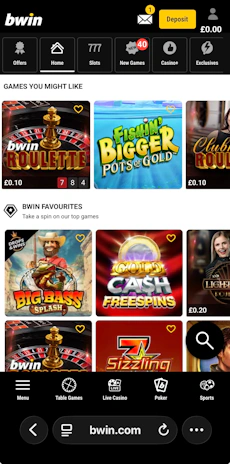
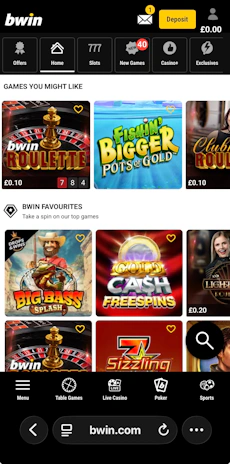
When first landing on the Bwin app, you are thrust into the sportsbook. You can navigate to the "Casino" through the app footer and, then, you'll see the footer options change.
Now, based from the traditional casino, you will be able to navigate across:
- Table Games
- Live Casino
- Poker
The casino, live casino and table games section are very closely aligned in design structure and navigation. Across the top of the app page, you've got small rectangles, with icons and text embedded within them. This is your navigation bar to explore different game types.

Under that, it is all about the game lobby. Again, you can scroll horizontally through different game tiles, whilst a vertical exploration is aided by sub-headings, such as "Ones to Watch" and "Classics".
If that layout helps navigation, the search functionality transforms it progress further. You can browse by a text search or through filter buttons, albeit deep filters like game volatility are lacking.
As for the game tiles themselves, they vary in size and shape but are easy to browse through and look good courtesy of being well-sized, even at their smallest, and having curved corners for a modern look. You can favourite games too.
Customer Support on the Bwin App
The Bwin customer support is a real letdown, both on the app and more generally.
You can navigate to a "Help & Contact" option within the app footer, where you will find a reasonably detailed FAQ section. That is structured in an easy to follow manner, albeit there is no way of searching phrases, so you have to rely on menu navigation to find what you want.
The real miss, though, is no signposting to email, phone or live chat functionality.
Expert Opinion of the Bwin App

To be honest, the Bwin app is amongst the best mobile apps we've tested. It is cleanly structured, looks good, operates well across all of its core areas and doesn't miss a beat as you manoeuvre from place to place.
The one thing that really lets it down is the half-baked customer service offering. So much of the app is clearly built with the user in mind, which makes it even more mind-boggling that it drops the ball where customer care is concerned.
With that noted, we'd still highly recommend downloading the Bwin app.

Ashley, an Ipswich Town fan, is an experienced content writer in the sports & betting space, who also has an extensive background in data analytics. Those skills combine here to allow for unique angles to be taken across a host of topics.