PlayWins App Review: User and Expert Ratings (2026)
We have put the PlayWins app to the test, with the sole purpose of informing you of whether it's worth downloading or not.
We downloaded it from the App Store and went through the critical app processes, including registration, deposit and withdrawal, while analysing the critical structure and navigation.

PlayWins App Ratings, Reviews & Download Links
First things first, we have to highlight the fact that the PlayWins app is currently only available to iOS users. It does feel like a strange choice, given it immediately excludes a host of users with Android devices.
It might change further down the line but, for now, Android users will have to use the browser version of PlayWins, or use a brand that does offer a suitable app.
For iOS users, we'll be providing a detailed assessment of what the PlayWins mobile app has to offer, but our role is to make your decision-making process easier. That's why we have also curated the ratings afforded to the app from the App Store:
- ⭐ 4.4 on the App Store (142 reviews)
142 reviews isn't an incredible sample size of reviews, but there is enough customer thought offered that you shouldn't simply ignore it. At 4.4 out of 5.00, the general consensus is a good one!
-
PlayWins App Details


How to Register on the PlayWins App
Existing PlayWins customers can simply use their existing details to log in to the app. For new customers, you can complete your end-to-end journey in the app.
The PlayWins sign-up process is detailed below, specifically for app users.
-
Open the App and hit "Join"
Once downloaded, open the PlayWins app and hit the yellow "Join" button that is located in the top right corner.

-
Enter Your Personal Details
Input your personal details into the cells provided. This consists of:
- Title
- Name
- Date of Birth
Hit "Next Step" when done.

-
Create Your Account Details
Configure your account username and password. You also have the option to set your deposit limits on this page, by following the link attached to the blue underlined text.
When happy with your inputs, hit "Next Step".

-
Enter Your Details and Confirm
You now need to enter a few more personal details, namely your address, phone number and email address.
Once done, check out the relevant tick boxes, marking them as you see fit.
Finally, hit "Create My Account".

PlayWins App Deposits & Withdrawals
We have tested the deposit and withdrawal processes on the PlayWins app, but since they are rather comprehensive subjects, we have dedicated pages for you to check out. On those, you can find all the details about the methods, the step-by-step process and other helpful tips.

PlayWins App Sports Review
If you are after a rundown of what specific sports are covered at PlayWins or what the market depth and betting margins look like, then you need to check out our in-depth PlayWins review.
Here, our focus is purely on the PlayWins app. We'll touch on some of the sports and markets as examples but we're assessing the structure and navigational efficiency of the sportsbook - not what is in it.
On those fronts, you won't be disappointed. There is a fair bit going on but it all aids the usability in reducing the number of clicks to get where you want to go.

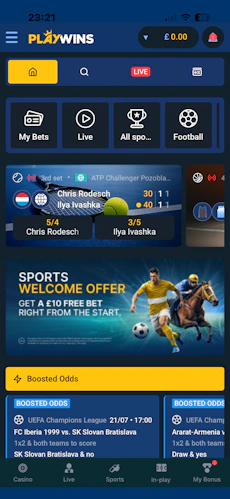
Starting from the top of the app and working down, you have a slimline four-wide icon menu allowing access to the homepage, a search function, live markets and your bet history.
Immediately beneath that is a slightly larger menu, which scrolls horizontally; this allows you to browse across the "key" sports, whilst an "All Sports" button also exists. Each button here contains an icon and text, making it easy to interpret.
The PlayWins sportsbook homepage then runs off into a list of promoted events and upcoming fixtures. Most people, however, are likely to target a specific sport. There is a consistency across the sportsbook layout, but each sport does take on a slightly different feel. This is due to the event structure and varying markets that are available to bet on.

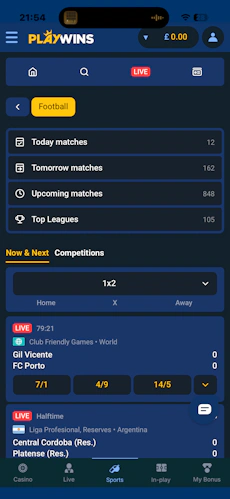
Football is the headline sport covered at PlayWins, even if the bookie doesn't match the best football betting sites. That view gives you the ability to isolate fixtures by date and top leagues, whilst a deeper "Competitions" section also exists.
The odds structure is pretty smart too. Price changes come colour coded across the odds, making it simple to see where a price is shortening or drifting. There is also the ability to change the default list view away from just showing 1X2; the core options you can pick between are:
- Total Goals
- Both Teams To Score
- Double Chance
- Draw No Bet
- 1X2

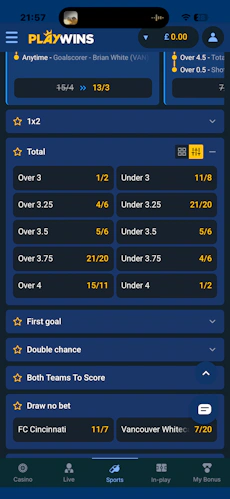
You can tap into much deeper market depths by clicking into a specific event. There is a familiar feel to the design here, with scrollable menu panels, search options and odds layout.
The only real thing to highlight here is the ability to flex the odds display. You can favourite odds, collapse and expand markets and, in instances like total goals betting, toggle between a grid and slider layout.

Whilst other sports will present slightly differently, football gives a good example of the sort of flexibility the PlayWins app offers in the sports space.
PlayWins App Casino Review
The PlayWins app casino section, which is accessed via one of the footer buttons, is fine. Nothing more, nothing less.
The top part of the screen is dominated by trending games and promotions, with a search function and category-level scroll bar positioned beneath that.
That area allows you to look at games by type, software provider and, if really targeted, specific game title. It all works well enough, with each aspect responsive to a finger tap and swipe.

You're then into the game lobby itself. At the top, you get some of the biggest game names featured; these are smaller game tiles with the game design overlapping the edges for effect. It does the job of pulling your attention.
Then you get into larger game tiles, square in shape but with deep curves on each corner, which gives a modern and sleek feel to the area. Swiping left and right allows you to explore the game lobby in its entirety.
If we were to have any points of criticism, it would be that filtering is limited, whilst the ability to favourite games and get insight into a quick "info" window without having to load the full game wouldn't go amiss. They're all minor points that would enhance the customer experience.
Customer Support on the PlayWins App
The PlayWins customer service section is somewhat buried on the app, but once you find it, it's not bad.
Your headline event is probably the FAQ. It is really well structured. There are various categories that you can navigate between easily and each question is then displayed with the ability to expand and collapse it for the answer; it is much slicker to use than an FAQ that is just a long page of text.
The actual customer contact process is okay. Live chat is your best avenue, which is available seven days per week, but not 24 hours per day. You can reach out between 08:00 and 23:00 Monday to Friday, with a 12-hour shift between 10:00 and 22:00 covering Saturday and Sunday.
You can make email contact through a form on the site too.
All of this information can be found by scrolling into the app footer and expanding the "PlayWins" button. There you'll see multiple options but with two named "FAQ" and "Contact Us".
Expert Opinion of the PlayWins App

It would be overselling it to suggest that downloading the PlayWins app would transform your experience of what this operator has to offer. It certainly won't dampen your experience, though.
We'd probably suggest there is enough upside through push notifications and purely having it "on hand" to make a download worthwhile. It is pretty kind to device memory as well!
More PlayWins Guides


Ashley, an Ipswich Town fan, is an experienced content writer in the sports & betting space, who also has an extensive background in data analytics. Those skills combine here to allow for unique angles to be taken across a host of topics.