Swifty Sports Withdrawal Time Test: Instant via Apple Pay (2026)
If you are wondering how long it takes to get your money out of Swifty Sports then, rest assured, we've completed that test so you don't have to.
We submitted a withdrawal request utilising the payment method Apple Pay. During our test, funds were received back into our account almost instantly, with just 60 seconds between finalising our withdrawal and our banking app confirming receipt of the funds.
We will detail our full test results and the step-by-step withdrawal process here.
How Long Do Swifty Sports Withdrawals Take? (Our Test)


Swifty Sports Withdrawal Time for Each Payment Method
When people are on the lookout for a new bookmaker, they are often wowed by strong promotional offers, deep betting markets and a fancy design. All of that stuff is really important - but so is being able to get your funds out.
With Swifty Sports not exactly a household name in the industry, we have put it through its paces looking at every component of the site during an in-depth bookmaker review. Here, our sole focus is on the withdrawal process.
This includes looking at the methods available, the specific process of withdrawing funds and assessing the speed of withdrawal.
| Payment Method | Min Withdrawal | Max Withdrawal | Withdrawal Fee | Withdrawal Time |
|---|---|---|---|---|
 Visa | £10 | £5,000 | No fee | 1-3 business days |
 Mastercard | £10 | £5,000 | No fee | 1-3 business days |
 Apple Pay | £5 | Not specified | No fee | Instant in our test |
 Instant Bank Transfer | £10 | £5,000 | No fee | Within Hours |
What Is the Fastest Way to Withdraw Money From Swifty Sports?
If speed of withdrawal is high on your list of demands for a bookmaker, then you will be pleased to know that Swifty Sports is competitive with some of the fastest withdrawal sites, particularly when using Apple Pay.
We've tested Swifty Sports multiple times with the method. Our very first Apple Pay withdrawal took a few hours during our testing, but our second attempt with the method saw an almost instant return, which is great.
How to Withdraw Funds From Swifty Sports
Withdrawing funds from Swifty Sports is easy. Just follow our step-by-step guide below:
-
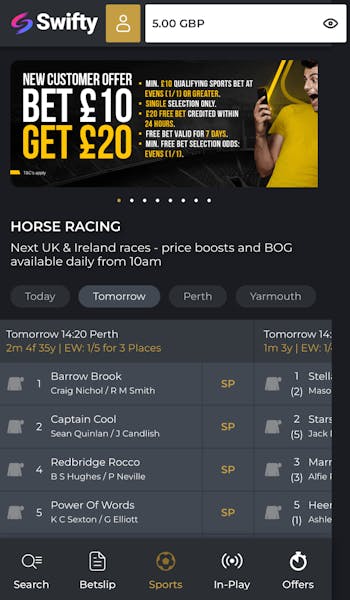
Open Your Account Section
Ensure you are logged into your Swifty Sports account. Then, in the top header bar, open your account details; this is accessed via the gold head and shoulders icon.
-
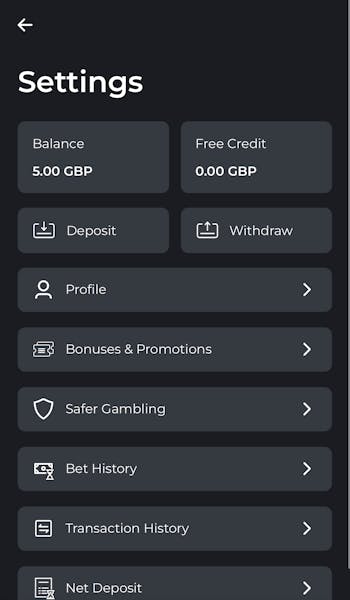
Hit the 'Withdraw' Button
Your account section contains a whole host of different sections; second down on the right hand side will be a 'Withdraw' button. Click it.
-
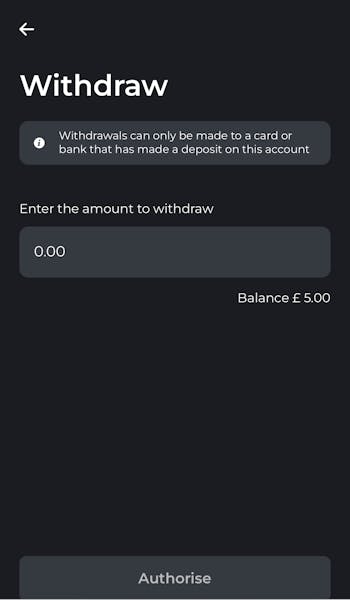
Set Your Withdrawal Amount
All you have to do in the first instance is configure your chosen withdrawal amount. Once input, the 'authorise' button at the bottom of the page will turn gold. Press it.
-
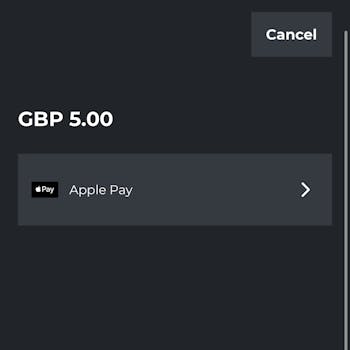
Choose Your Withdrawal Method
Withdrawal options are limited to the methods from which you have deposited. If you have deposited from multiple methods, you will need to choose your withdrawal method from those available to you.
If, however, you've only deposited from one method then simply choose that.
Swifty Sports Withdrawal Pending
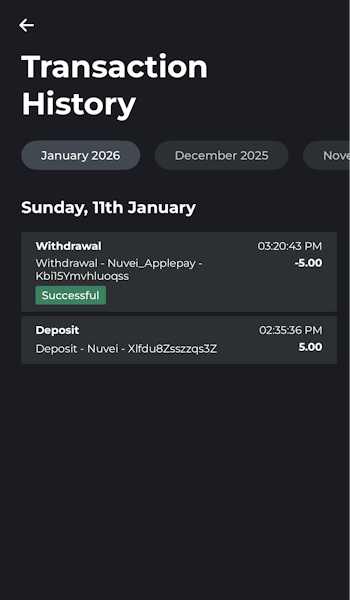
On submitting your Swifty Sports withdrawal request, you can check the current status of your transaction by navigating to your account profile and then selecting "Transaction History".
Here you will be able to locate your withdrawal request, whilst the status of the withdrawal will be stated alongside it.
During our testing, the withdrawal was processed within around one minute, hence the transaction history states "Successful".
Swifty Sports Withdrawal Time FAQs
What is the withdrawal time at Swifty Sports?
What payment methods does Swifty Sports accept?
Can you withdraw the Swifty Sports welcome bonus money?
More Swifty Sports Guides


Ashley, an Ipswich Town fan, is an experienced content writer in the sports & betting space, who also has an extensive background in data analytics. Those skills combine here to allow for unique angles to be taken across a host of topics.