Paddy Power Withdrawal Time Test: Instant via Visa (2026)
Wondering how long it actually takes to get your money from Paddy Power? We put the withdrawal time to the test using real money and a Visa debit card, receiving our money instantly.
In this guide, you will find our full test results, the step-by-step breakdown of the process, and tips to get your money out faster.
How Long Does a Paddy Power Withdrawal Take? (Our Test)


Paddy Power Withdrawal Time for Each Payment Method
Paddy Power is one of the biggest UK bookmakers, having been in operation for almost 50 years. With a fantastic sportsbook and casino option, the site is further strengthened by a strong range of payment methods, which makes it a very complete package for punters.
Below, we have collected everything you need to know about withdrawing funds from the site. In addition to the minimum withdrawal amounts, we have listed the withdrawal time for each payment method at Paddy Power.
| Payment Method | Min Withdrawal | Max Withdrawal | Withdrawal Fee | Withdrawal Time |
|---|---|---|---|---|
 Visa | £5 | Not specified | No fee | Instant in our test |
 Mastercard | £5 | Not specified | No fee | 2-5 business days |
 Apple Pay | £5 | Not specified | No fee | 2-5 business days |
 Instant Bank Transfer | £5 | Unspecified | No fee | 2-5 business days |
 Skrill | £30 | Unspecified | No fee | 2-5 business days |
 Neteller | £30 | Unspecified | No fee | 2-5 business days |
 Paysafecard | £30 | Unspecified | No fee | 2-5 business days |
 Bank Transfer | £30 | Unspecified | No fee | 2-5 business days |
 PayPal | £30 | Unspecified | No fee | 4-24 hours |
What Is the Fastest Way to Withdraw Money From Paddy Power?
Having seen a few varying estimates of the withdrawal, we put Paddy Power to the test ourselves and were left feeling amazed. Indeed, we used a Visa debit card and the bookmaker paid out instantly, which very few UK bookmakers can replicate.
Whether that translates to other payment methods, however, is uncertain. Apple Pay and Instant Bank Transfer are likely to be pretty quick too, but perhaps not instant as Visa.
How to Withdraw Funds From Paddy Power
If you are keen to learn more about withdrawals at Paddy Power, you can follow our step-by-step guide below on how to withdraw funds from the site. For context, we tested it on the app.
-
Go to the Withdrawal Cashier
When you are ready to withdraw funds, head back to the 'Profile' area where you initiated the deposit, using the icon in the top right. Then, tap 'Withdraw'.

-
Enter the Withdrawal Amount
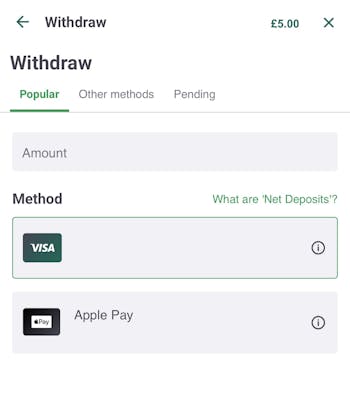
On this page, you will be shown a list of payment methods which can be used to withdraw your funds. As usual, we chose to use a Visa debit card.
-
Request the Withdrawal
Finally, tap your chosen method, and enter the amount you'd like to withdraw, then tap the option to do so at the bottom of the screen.
As can be seen below, we did not even have time to leave the confirmation page before our money had arrived.

Paddy Power Withdrawal Status and History
We never needed to check the status of our withdrawal, simply due to the fact that the money was in our account whilst we were on the confirmation screen.
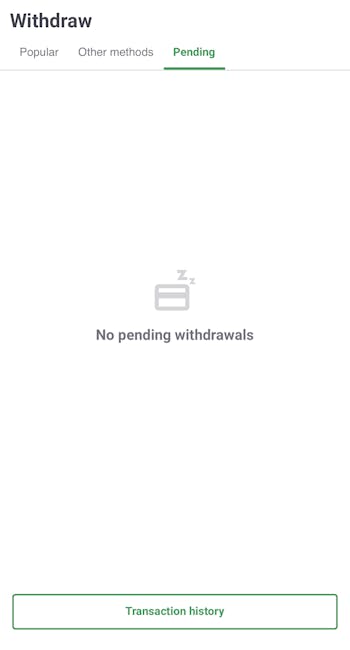
However, if you are wondering where your money is, you can get a status update via the withdrawal cashier. Indeed, enter the area, and then tap 'Pending' to see your current withdrawals.
Additionally, you can view your transaction history at the bottom of the page.
Paddy Power Withdrawal Time FAQs
What is the withdrawal time at Paddy Power?
Which withdrawal methods do Paddy Power offer?
More Paddy Power Guides


Ben is an accredited football journalist who follows anything from League One to Serie A, also working for the likes of SempreMilan and Total Italian Football. As an avid punter, he has become the master tester at BettingLounge, refusing to take bookies by their words when it comes to withdrawal times and much more.