Highbet Apps: Download The Latest Android and iOS Versions (April 2026)
Highbet have been around for a few years but it was only in early 2025 that it underwent a complete refresh and relaunch, with SGCO Limited (UKGC: 44662). It means it not only launched aware of the mobile-friendly demands customers have but also had a "version two" reset moment to really nail it.
There are two ways you can go about downloading the app. The first is to navigate to the Highbet website. Here you will see a "Get the App" banner appear across the top of the page, with an option to follow a download link. The other is to head straight to your chosen app store. Highbet's mobile app is available to Android and iOS users.
Regardless of your device, head to the app store of your choice and search for the term "Highbet". You are looking for the mobile app by Time Solutions.
The app itself is memory-minimal. It is just 9.7MB, which means even the most basic of smartphones will be able to download and operate the app.
As for how it is rated, you cannot make any decisions based on the reviews on the app store; the number of reviews conducted are just too minimal.
Thankfully, our Highbet mobile app review will cover everything you need to know, and we're not afraid to shine a light on negatives either!
-
Highbet Apps
Google Play App Store


Expert Opinion of the Highbet App

From a general point of view, there is a lot to like about the Highbet app. The navigation is pretty decent, the design is largely good, and it's memory-friendly for mobile devices.
The absence of having "Sports" as a mainstay on the site footer is a real annoyance though. Then you get into genuine deal breakers.
We were not able to complete a deposit or withdrawal on the app, having to revert to the browser version to complete those steps. It was a similar experience with the customer support. Until we can gain confidence, those things are no longer an issue, we cannot recommend the app.
Thankfully, the in-browser experience at Highbet is pretty solid, giving punters an alternative way of betting with it.
How to Register on the Highbet App
Getting started on the Highbet mobile app is simple.
If you have already signed up with the operator, then it is simply a case of downloading the app and logging in with your usual details.
If you are a new customer, you can download the app and register from there. It is a straightforward process, but we've detailed the steps for you below to ensure a smooth start:
-
Open the App and Hit 'Sign Up'
When opening the app, head to the top right corner and locate the lighter blue "Sign Up" button.
Click on it.

-
Complete the Registration Form
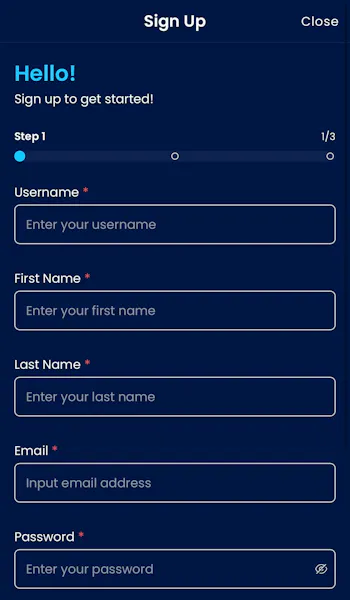
The registration form at Highbet is a three page process. Page one requires you to define a username and password, whilst also entering your name and an email address.
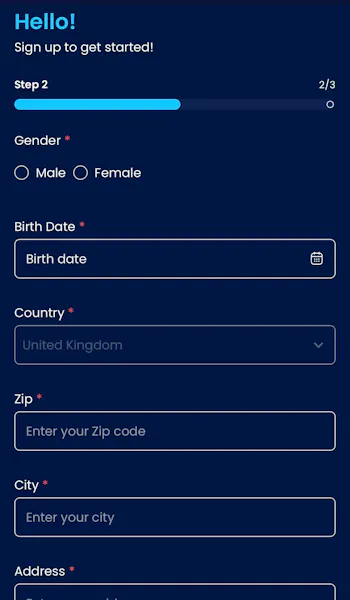
Page two asks you to confirm a few more personal details, including your gender, date of birth and address.
Further down the page, there are also some responsible gambling options to be configured, specifically, deposit limits.
Once content with your choices, hit the "Next" button at the bottom of the page.
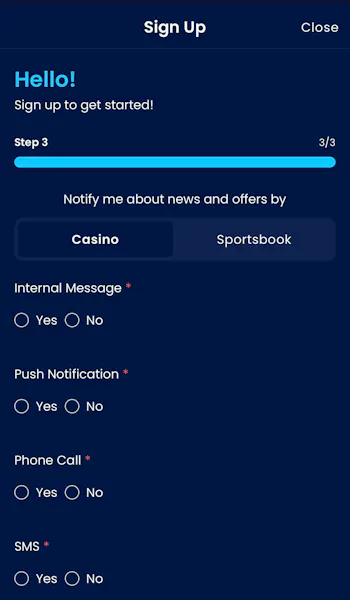
The third and final page of the sign up form is heavily dominated by defining marketing preferences, which is a series of "yes/no" questions.
You will also need to agree to terms and conditions. Once done, hit the "Sign Up" button.
How to Deposit on the Highbet App
Depositing funds at Highbet is simple, but we had some issues using the app. Check out our Highbet deposit process below:
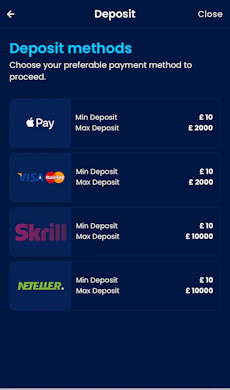
| Payment Method | Min Deposit | Max Deposit | Deposit Fee | Processing Time | Triggers Bonus |
|---|---|---|---|---|---|
 Visa | £10 | £2,000 | No fee | Instant | |
 Mastercard | £10 | £2,000 | No fee | Instant | |
 Apple Pay | £10 | £2,000 | No fee | Instant | |
 Skrill | £10 | £10,000 | No fee | Instant | |
 Neteller | £10 | £10,000 | No fee | Instant |
-
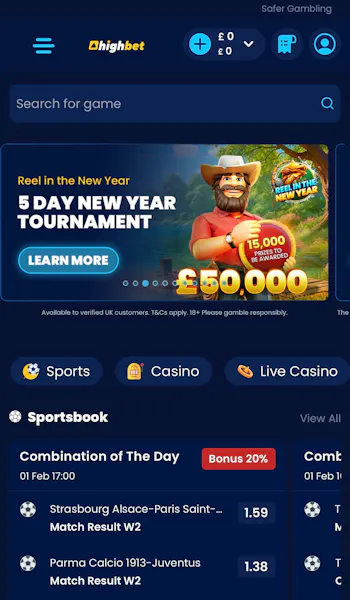
Click on Your Account Balance
Once logged into your Highbet account, the app header bar will contain an account balance icon, represented by a navy blue '+' sign in a lighter blue circle.
Click on it.
-
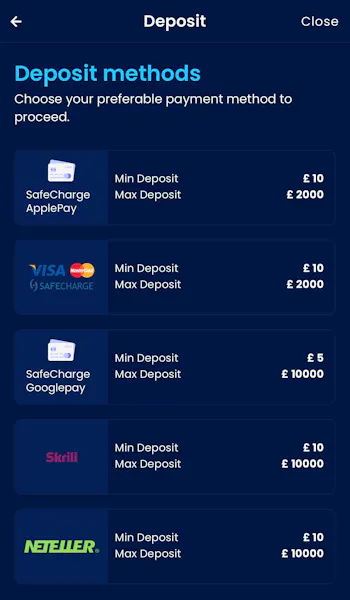
Select Your Payment Method
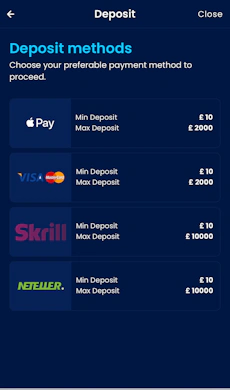
You should now be presented with a screen detailing a range of different payment options, each detailing the minimum and maximum amounts.
Choose your preferred payment method by clicking on it.
-
Choose Your Deposit Amount
You will be taken through to a simple page to submit your deposit amount. Simply input your desired deposit value into the "Amount" box.
Once a valid amount has been entered, the "Deposit" button at the bottom of the screen will become active, and should allow you to advance to the next step.
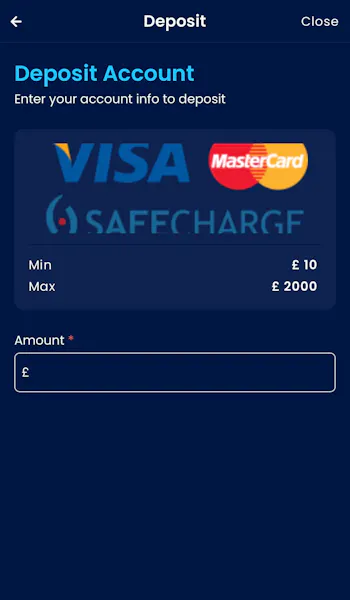
*Note - when depositing via the mobile app, our process got stuck at this point. We had to complete the remaining deposit steps in browser view.
-
Enter Your Payment Details
After determining your deposit amount, you now need to provide the details associated to your chosen banking method.
Once done, you will see a basic screen confirming that your deposit has been successful.

How to Withdraw on the Highbet App
With a bit of good fortune, at some point you will find yourself in a position of being able to withdraw funds from your Highbet account.
You can withdraw funds directly from the Highbet app, but we did run into some issues. Follow our step-by-step process to do so:
-
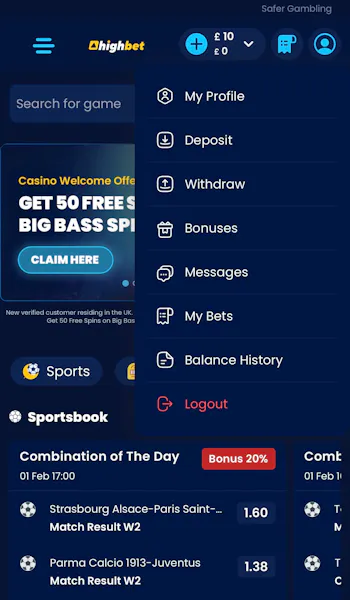
Navigate to Your Account
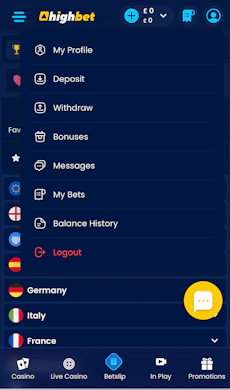
In the top right corner of the Highbet app you will see a light blue head & shoulders icon. This is your account menu.
Click to expand it.
From there, click on the "Withdraw" option.
-
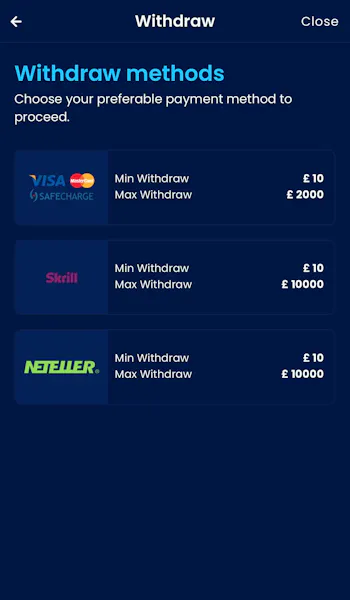
Choose Your Banking Method
You will be able to see the available withdrawal methods, which won't necessarily be as extensive as the deposit options.
Choose your desired method by simply clicking it.
-
Enter the Amount to Withdraw
You will be presented with a very basic screen now. Key in your desired withdrawal amount into the "Amount" box.
When done, click on the "Withdraw" button at the foot of the page.
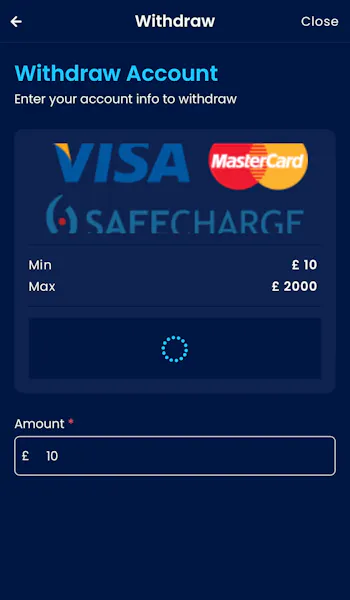
*Note - when withdrawing via the mobile app, our process got stuck at this point. We had to complete the remaining withdrawal steps in browser view.
-
Enter Your Withdrawal Details
The next step in your process is to confirm the banking details for where you want your funds to be returned.
You will then see a screen confirming you "withdrawal request has been received".
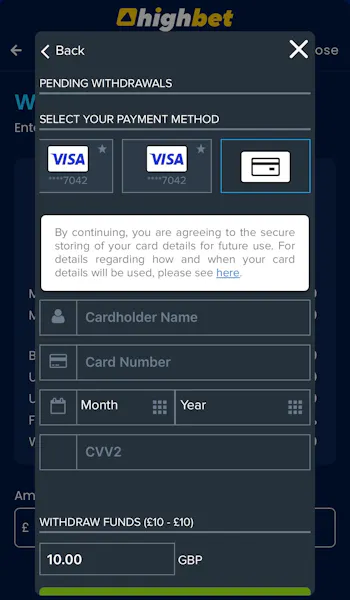
Despite the app issues, Highbet's withdrawals are quick once processed, with our Visa Direct test withdrawal landing in 29 minutes.
Highbet App Sports Review
We already have an in-depth Highbet review that explores everything the sportsbook has to offer; this looks at competition coverage, promotional offers, market depth and more. This is our Highbet app review and, as such, focuses on the structure of the sportsbook in the mobile app.
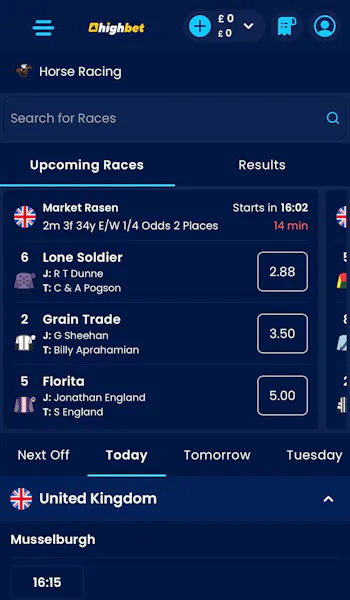
The first thing to note is that Racing forms a huge part of the Highbet offering and is contained in its own section, which is accessible from a horizontal menu bar that runs across the footer. The wider sportsbook - minus racing - is elsewhere.
In order to access it, you have to navigate back to the Highbet home page, which you can do by hitting the app logo in the header bar.
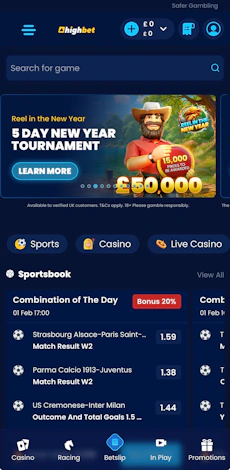
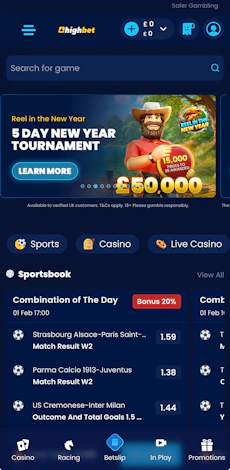
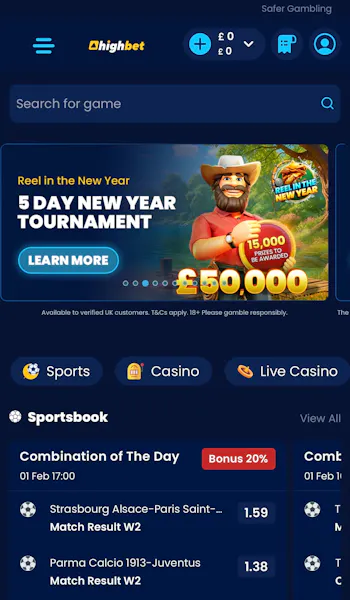
You will then be presented with a screen where the top third of the page is dominated by special offers. Beneath that, you have a scrollable menu running the width of the page; the first option on this menu is "Sports". It's not the slickest way to get to the sports landing page.
Once in the sportsbook, there is a lot of similarity in page structure. The use of horizontal, scrollable menus is consistent. With the specifics of the sportsbook, they allow you to manoeuvre between top competitions, specialist markets and key dates e.g. "today".
Under that, you can utilise a secondary menu to target specific sports, which can also be done within the burger menu, which is located in the very top left corner of the app.
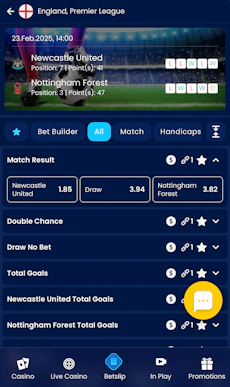
The buttons are all responsive, the menus are easy to swipe through and having the ability to expand and collapse certain items as you explore the sportsbooks makes for a pretty slick user experience.
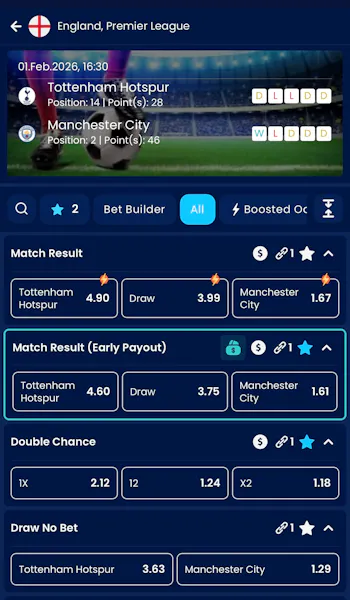
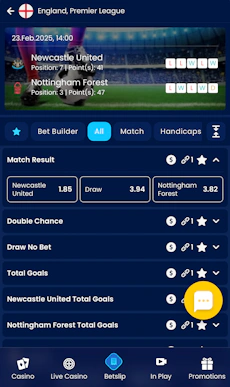
That slickness continues as you delve into deeper markets, be that a defined competition or a specific event. Odds are cleanly displayed with white outlines, making each price distinguishable from another, whilst you have the ability to favourite items at every layer.
All in all, it's a shame "Sports" does not form a key menu pillar but, beyond that, the sportsbook is clean, tidy and generally quite strong.
Highbet App Casino Review
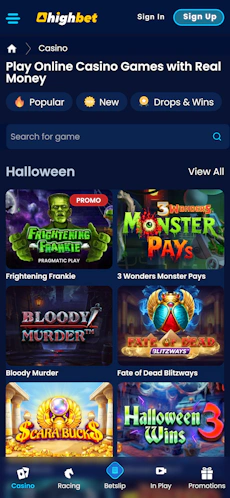
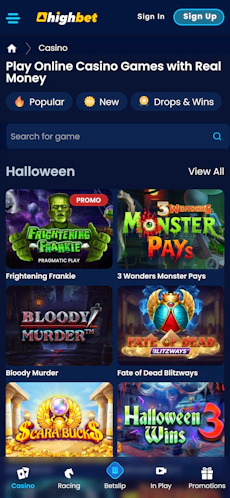
There is not loads to say about the Highbet casino, certainly not when talking about how the app enables play.
You can access the casino game lobby from the horizontal menu that runs across the bottom of the app and, then, navigation is controlled in two different ways.
You have a horizontal scroller across the top of the page, which enables you to explore different game categories, whilst also offering the ability to filter by software provider. Then, underneath that, you have a text search bar, where you can type in the name of a game.
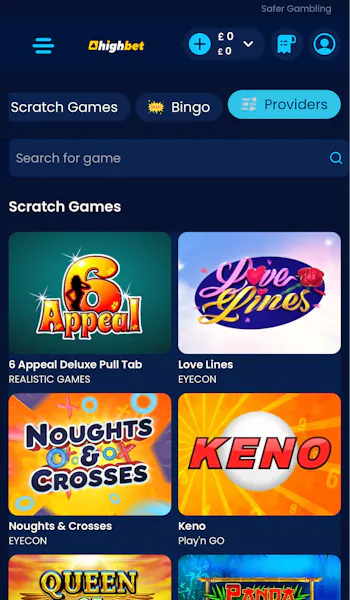
As for the game lobby itself, the landing page offers a previous of each game category, with a "view all" option then presented as an alternative way to drill into the available games.
The layout of the lobby is very good though. Game tiles are large, running just two to a row, making interaction on a phone extremely comfortable.
You are able to favourite games and see more information about them without having to fully enter the game too, which enhances the hands-on experience.
Customer Support on the Highbet App
It is hard not to be frustrated by the customer support function on the Highbet app. The only real nod towards any support comes buried within the site footer, first as a high-level FAQ and then as a bog-standard "contact us" link, which lives alongside a host of other links.
It feels very much like an after-thought, not a building block of genuinely wanting to put the customer first. That is proven again with the contact methods available in the app.
You can submit questions through an email form and whilst the in-browser site offers a live chat function, the app does not. There is a general "support" button in the same location, which we assume would default to the live chat but it is unresponsive.
More Highbet Guides


Ashley, an Ipswich Town fan, is an experienced content writer in the sports & betting space, who also has an extensive background in data analytics. Those skills combine here to allow for unique angles to be taken across a host of topics.