Dream Vegas Apps: Download The Latest Android and iOS Versions (April 2026)
Dream Vegas is a relatively modern brand, having launched in 2018, but also has a host of experience behind it courtesy of the agreement with White Hat Gaming Limited (UKGC: 52894). That company has 40 different domains under its umbrella.
The reason that is relevant to the Dream Vegas app is two-fold. First, Dream Vegas entered the market at a time when mobile apps were already known to be "a thing". Second, with WHG having so many domains, there will have been plenty of conversations happening that would, or at least should, have fed into what does and doesn't work for a mobile app.
We will unpick how Dream Vegas performs on that front but, before that, we need to understand how to actually find the app.
You can find the app on the Dream Vegas website. If you go down that route, there are two places to find the app. You will see a pop-up along the very top of your screen, whilst in the site footer there is an additional piece of app signposting.
Alternatively, you can head directly to your app store of choice. Once there, search for the term "Dream Vegas" and locate the app before initiating download.
-
Dream Vegas App
Google Play App Store


Expert Opinion of the Dream Vegas App

The Dream Vegas app is a pretty solid offering, all things considered. It looks smart, operates pretty slickly across the board and enables bettors to receive push notifications too.
If we were to pick out some slight annoyances, it doesn't provide much in the way of differences versus the browser version. Of course, not having to open a browser can be seen as enough incentive for punters to download the app, but usually we like to see something more at least.
How to Register on the Dream Vegas App
Getting up and running on the Dream Vegas app is easy. If you're reading this as an existing customer of Dream Vegas, it is simply a case of downloading the app and logging in using your usual details.
If you are new to Dream Vegas, that is not a problem either. You can register directly on the mobile app. That process is explained below:
-
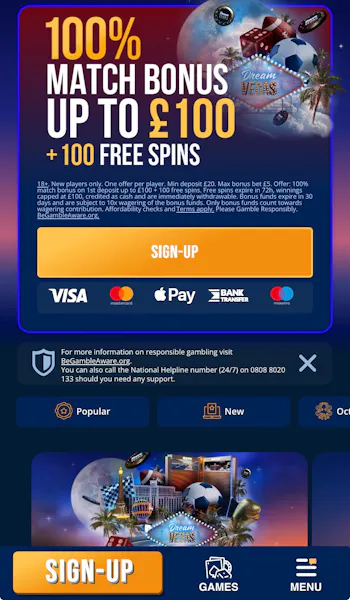
Open the App and Hit 'Sign Up'
After downloading the app, open it. Locate one of the two orange 'Sign-Up' buttons and click on it.
-
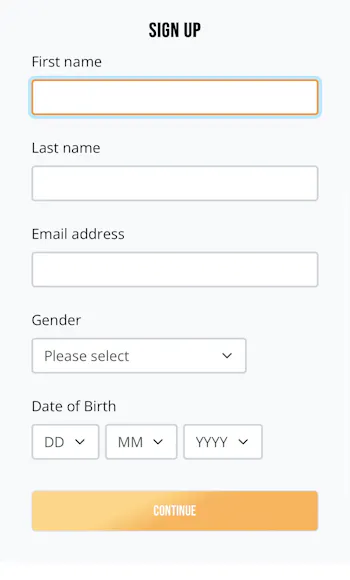
Start the Registration Form
You will now be presented with a sign-up form. The first page of the form requires you to input key information including name, email address and date of birth.
Hit the orange 'Continue' button at the bottom of the page when content your information is input correctly.
-
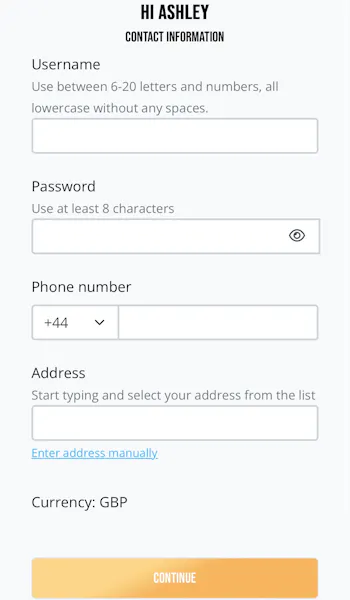
Create a Username and Password
On page two of the registration form, you will need to create a username and password, whilst also confirming your phone number and address details. Again, once done, hit the "Continue" button at the foot of the page.
-
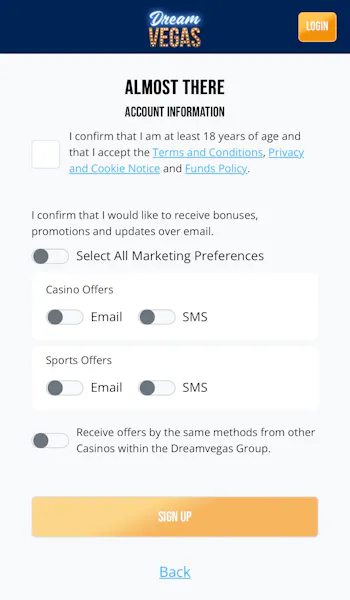
Set Preferences and Complete Registration
You now just have two quick pages left to navigate. The first asks you to set any deposit limits. Lastly, you can configure your contact and marketing preferences. You can now hit the orange 'Sign Up' button to finalise your registration.
How to Deposit on the Dream Vegas App
After registering, you will want to deposit funds into your account. Our Dream Vegas deposit process has you covered:
| Payment Method | Min Deposit | Max Deposit | Deposit Fee | Processing Time | Triggers Bonus |
|---|---|---|---|---|---|
 Visa | £20 | Not specified | No fee | Instant | |
 Mastercard | £20 | Not specified | No fee | Instant | |
 Revolut | £20 | Not specified | No fee | Instant | |
 Apple Pay | £20 | Not specified | No fee | Instant | |
 Neteller | £20 | Not specified | No fee | Instant | |
 Skrill | £20 | Not specified | No fee | Instant | |
 Trustly | £20 | Not specified | No fee | Instant | |
 Paysafecard | £20 | Not specified | No fee | Instant | |
 Instant Bank Transfer | £20 | Not specified | No fee | Instant |
Apple Pay is only available when using the browser version of Dream Vegas, weirdly, meaning you cannot deposit with that method in the app.
-
Click on the 'Deposit' Button
Once logged into your Dream Vegas account, click on the 'Deposit' button located in the bottom left corner. It is hard to miss.

-
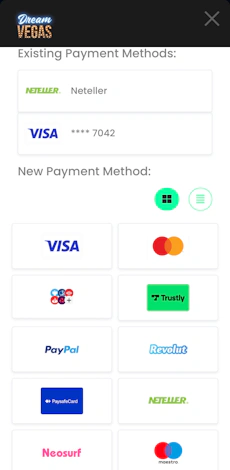
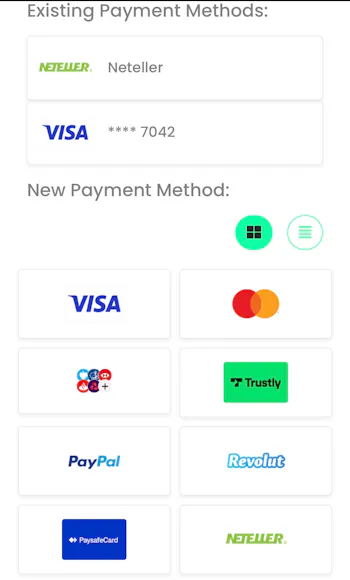
Select Your Payment Method
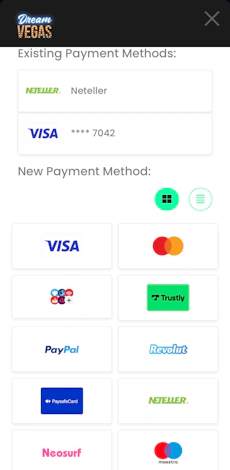
If you have previously deposited with Dream Vegas before, the top part of the screen will showcase 'existing payment methods'. Under that, there will be a grid - or a list depending on your preference - that shows all available payment options.
Click on your preferred payment type.
-
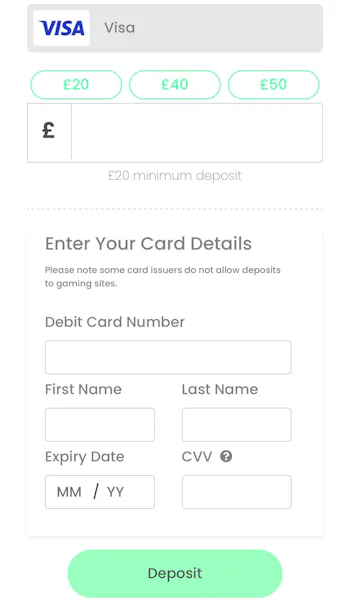
Enter Your Deposit Details
There are two parts to the next step. Firstly, you will have to declare a deposit amount. This can be manually keyed into the '£' box or you can opt for the quick reference deposit amounts, which are trimmed green at the top of the page.
Once that step is complete, enter your relevant payment details into the bottom half of the screen. Then, finally, hit 'Deposit'.
How to Withdraw on the Dream Vegas App
All being well, you will want to withdraw funds from the account at some point in the future. Follow our step-by-step Dream Vegas withdrawal process below:
| Payment Method | Min Withdrawal | Max Withdrawal | Withdrawal Fee | Withdrawal Time |
|---|---|---|---|---|
| Visa | £20 | Not specified | No fee | 7 hours in our test |
| Mastercard | £20 | Not specified | No fee | Up to 3 business days |
| Revolut | £20 | Not specified | No fee | 2 hours in our test |
| Apple Pay | £20 | Not specified | No fee | Up to 3 business days |
| Neteller | £20 | Not specified | No fee | 33 hours in our test |
| Skrill | £20 | Not specified | No fee | Up to 3 business days |
| Trustly | £20 | Not specified | No fee | Up to 3 business days |
| Paysafecard | £20 | Not specified | No fee | Up to 3 business days |
| Instant Bank Transfer | £20 | Not specified | No fee | Up to 3 business days |
-
Navigate to Your Account
Once logged into your account, you are able to open your account menu by navigating to the 'head and shoulders' icon in the bottom right corner.
You will then see a four-option menu appear on the screen. Pick 'My Account' from this list.

-
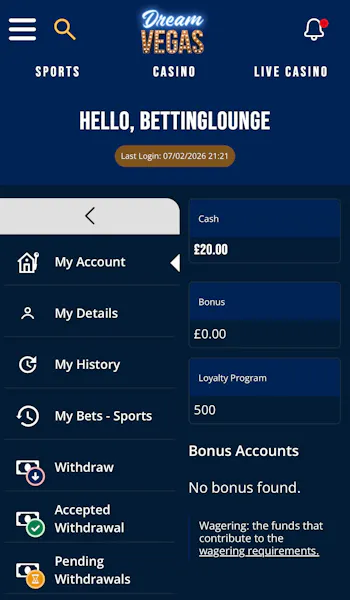
Select the 'Withdraw' Option
On reaching your main 'My Account' section, you will see a lengthy list of menu options running down the left-hand menu. Click 'Withdraw'.
-
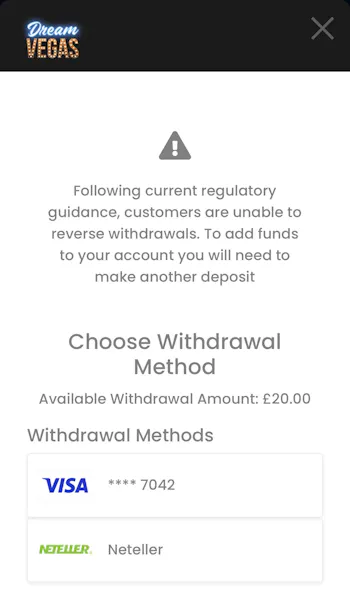
Choose Your Withdrawal Method
You will now be able to select the banking method you can withdraw to. The list of options will be limited to those methods you have deposited with previously. Click on your choice.
-
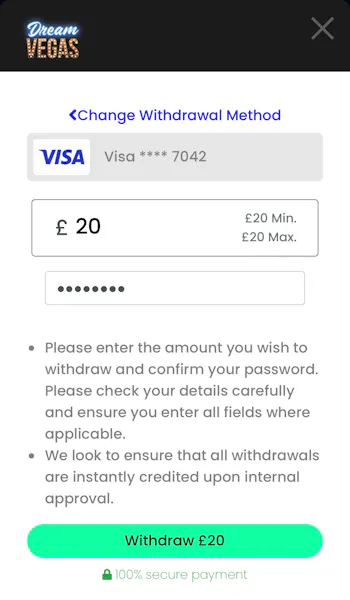
Enter Your Withdrawal Amount
In the next screen, you will simply need to key in your desired withdrawal amount into the '£' box and enter your password in the box below.
Finally, hit the green 'Withdraw' button. The withdrawal time will vary, as our tests of the site have shown.
Dream Vegas App Sports Review
The inner workings of the Dream Vegas sportsbook are already covered in our detailed Dream Vegas review.
Here, our focus is very much on the mobile app offered, which means understanding how the sportsbook is displayed, navigated, and generally works.
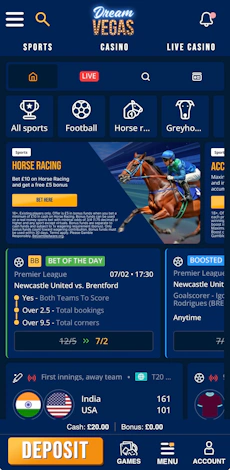
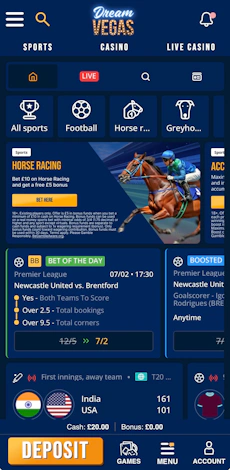
For starters, there are three core menu components that sit in the app header. One of these is 'Sports'. A click on that takes you to the sports homepage.
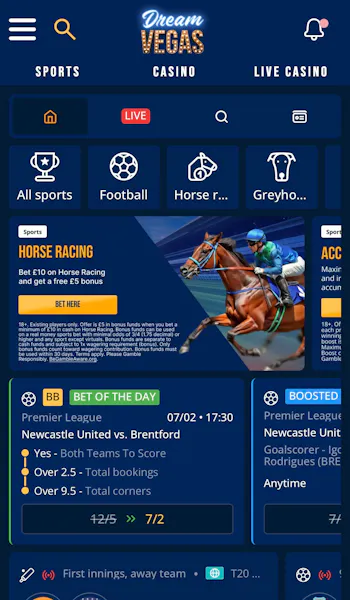
The structure within the sportsbook is very quick to get to grips with. There is a four-icon wide header bar that consists of the below areas:
- Home
- Live Sport
- Search Function
- Betting History
Underneath that, you have a horizontal scrollbar that enables you to swipe across the many sports available at Dream Vegas. They contain wording and line-drawn icons, making it easy to interpret what each button is linked to.
From there, on the default sports page, you have special offers dominating the screen courtesy of promotions and, below that, a 'Bet of the Day' feature and 'Boosted Odds' opportunities.
You then get into a range of sports betting events, which will vary depending on what is going on at any given time.
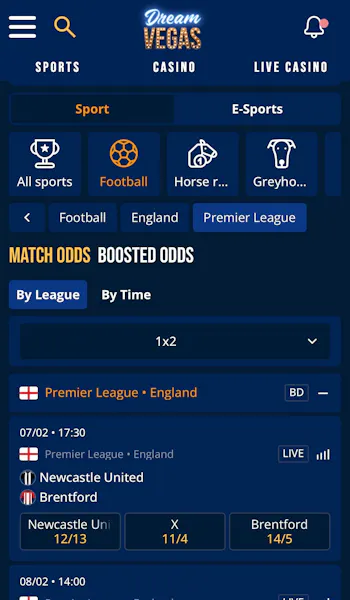
As you utilise the scroll bar to navigate to a specific sport, the view you have on the page changes. You will be presented with a mini-menu at the top of the page that allows for quick navigation to trending areas, for example 'Today Matches' and 'Top Leagues'.
You can then target specific competitions or 'Now & Next' markets. Once in a competition, the available events are displayed in blue boxes with a darker strip separating them from one another. It avoids confusion and means it's quick to scan through the page for odds interpretation.
You also have the ability to switch between some key markets at the top of the page, which reduces the need for click through. This is particularly useful for placing multiple bets. The fast-reference markets, using football as an example, are:
- 1x2
- Both Teams To Score
- Double Chance
- Draw No Bet
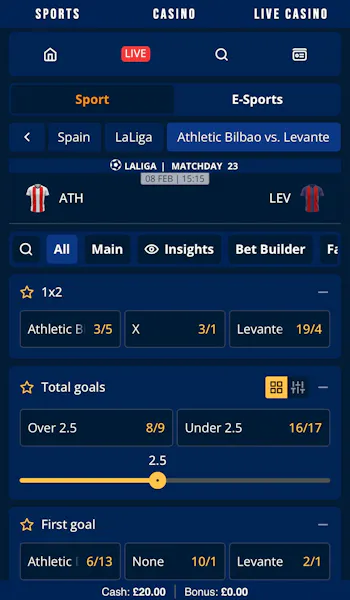
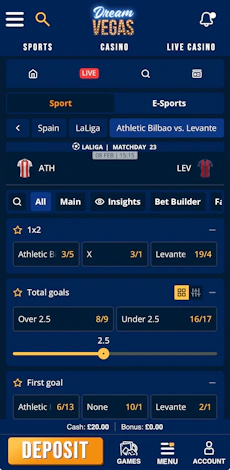
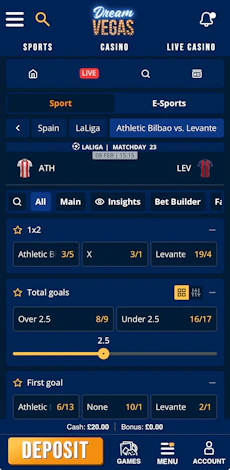
If you want to explore additional markets, you will need to click into an event. The layout is not dissimilar in working logic to the rest of the sportsbook.
You have another scrollable menu that runs horizontally across the page. This time it navigates between different betting angles, be that specific market types or time-specific bets and possible 'Insights'.
Amongst those options is an 'All' button, which exposes all markets attached to an event. You have the ability to switch how these present to you, which is a neat feature, and that allows users to expand and collapse markets.
If that's not enough, there is also a search feature within each fixture that allows you to find specific markets. It's all pretty neat, to be fair.
Dream Vegas App Casino Review
Keeping in mind that we are only here to focus on the app design and structure, we won't spend ages chatting about the Dream Vegas casino.
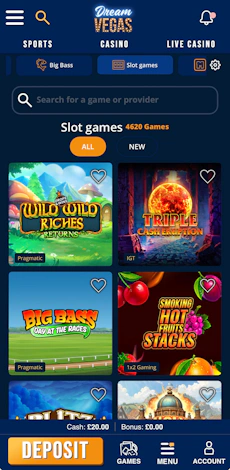
The casino is split into two components, both of which are easily accessible from the app header bar. The first part is the traditional casino.
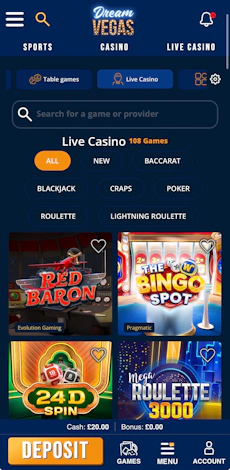
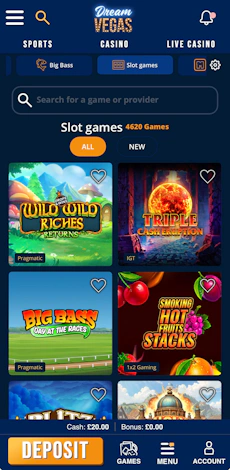
In the casino, you have a scroller bar running across the top of the page, allowing navigation between each casino gaming category. On the right-hand side, there is a 'settings' button - represented by a cog icon. Clicking it opens a small filtering tool.
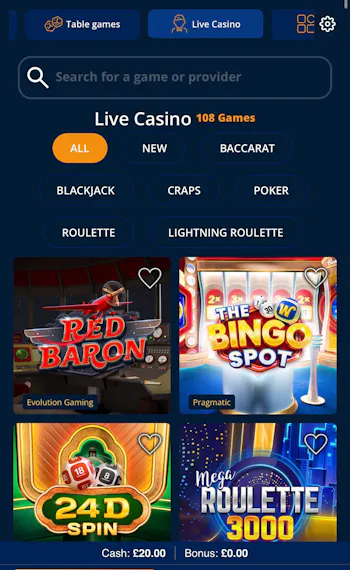
Step further down the page and you have a text search function followed by the physical game library. There, you have large, neatly presented game tiles. They are easy to interact with, whilst also possessing a heart icon in the top right corner. This allows users to favourite games.

You then have the 'live casino', which is located in its own section. The look and feel here is extremely similar, except you have another layer of game filtering here, courtesy of eight buttons positioned beneath the search box.
Customer Support on the Dream Vegas App
The customer support on offer via the Dream Vegas mobile app is fine. Nothing more, nothing less.
It is accessible through the 'Menu' button, where you will then see the option to 'Chat With Us'. Here you can connect to the live chat or, whilst not intuitive, open the broader 'Help Centre'. This is effectively just a well-structured FAQ page.
More Dream Vegas Guides


Ashley, an Ipswich Town fan, is an experienced content writer in the sports & betting space, who also has an extensive background in data analytics. Those skills combine here to allow for unique angles to be taken across a host of topics.