Dream Vegas Withdrawal Time Test: 2 Hours via Revolut (2026)
Wondering how long it actually takes to get your money from Dream Vegas? We put the withdrawal time to the test using real money and a Revolut debit card, receiving our money in 2 hours.
In this guide, you will find our full test results, the step-by-step breakdown of the process, and tips to get your money out faster.
How Long Does a Dream Vegas Withdrawal Take? (Our Test)


Dream Vegas Withdrawal Time for Each Payment Method
Withdrawals at Dream Vegas are tied to the payment method you used to deposit, which is standard across UK betting sites. However, the overall experience is a bit of a mixed bag.
We were also slightly concerned to see wording suggesting that all withdrawals are manually reviewed and could take up to three days.
Thankfully, our real-money Visa test provided a more positive story, landing in just 7 hours and 13 minutes, which is perfectly respectable, but not instant like some competitors.
The £20 minimum withdrawal matches the deposit limit, still higher than many UK competitors, but at least there’s a solid range of supported payment types to choose from.
| Payment Method | Min Withdrawal | Max Withdrawal | Withdrawal Fee | Withdrawal Time |
|---|---|---|---|---|
 Visa | £20 | Not specified | No fee | 7 hours in our test |
 Mastercard | £20 | Not specified | No fee | Up to 3 business days |
 Revolut | £20 | Not specified | No fee | 2 hours in our test |
 Apple Pay | £20 | Not specified | No fee | Up to 3 business days |
 Neteller | £20 | Not specified | No fee | 33 hours in our test |
 Skrill | £20 | Not specified | No fee | Up to 3 business days |
 Trustly | £20 | Not specified | No fee | Up to 3 business days |
 Paysafecard | £20 | Not specified | No fee | Up to 3 business days |
 Instant Bank Transfer | £20 | Not specified | No fee | Up to 3 business days |
What Is the Fastest Way to Withdraw Money From Dream Vegas?
If speed matters, Revolut is the best option, our payout arrived in just 2 hours. Visa is also solid, paying out in around 7 hours in our test.
How to Withdraw Funds From Dream Vegas
If you are new to Dream Vegas and don't know exactly how to withdraw, you can take a look at our step-by-step guide below:
-
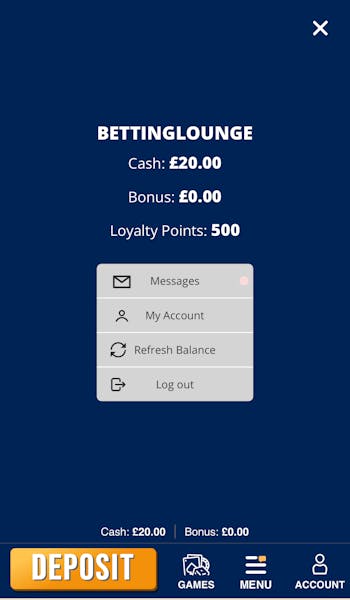
Open Your Account Section
When initiating a withdrawal request from Dream Vegas, your first step is to open your account section; this is the head and shoulder icon that is found in the bottom right corner.

This will bring up a new screen showing your account balance and four different options, one of which is called "My Account".
-
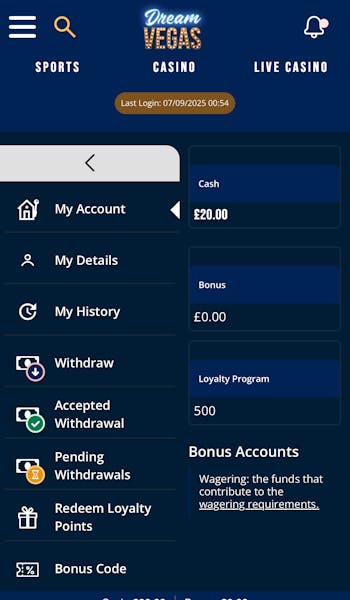
Hit 'Withdraw' in the Menu
You will see a vertical menu down the left-hand side of your screen. Locate the section named "Withdraw" and select it.
-
Set Your Withdrawal Amount
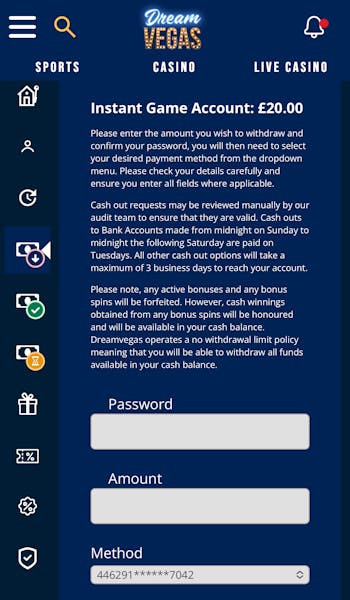
Once you tap Withdraw, the cashier will open. You may need to minimise the left menu to see everything properly.
From there, simply:
- Enter your account password.
- Choose the amount you want to withdraw.
- Select your payment method (must match one used for deposits).
- Tap Submit and confirm.
Then just wait for your funds to arrive.
Dream Vegas Withdrawal FAQs
How long does it take to withdraw from Dream Vegas?
What withdrawal methods does Dream Vegas have?
Can you withdraw the bonus amount on Dream Vegas?
More Dream Vegas Guides


Ben is an accredited football journalist who follows anything from League One to Serie A, also working for the likes of SempreMilan and Total Italian Football. As an avid punter, he has become the master tester at BettingLounge, refusing to take bookies by their words when it comes to withdrawal times and much more.